How to Use a Laser Distance Meter: Quick Guide
You’re standing in a large room, trying to measure wall-to-wall distance for new flooring. Your tape measure keeps sagging, and you’re struggling to get an accurate reading alone. Enter the laser distance meter—a compact, high-tech tool that delivers precise measurements in seconds, often without needing a second person. Whether you’re a contractor, DIYer, or real estate professional, knowing how to use a laser distance meter correctly can save time, reduce errors, and unlock advanced measuring capabilities.
This guide walks you through everything from basic operation to pro-level techniques. You’ll learn how to take accurate single measurements, calculate area and volume instantly, use Pythagorean mode for indirect measurements, and maintain your device for long-term reliability.
Power On and Set Up Your Laser Distance Meter
Most laser distance meters activate with a single press of the power or measure button. Some models like the ennoLogic eD560L turn on when you press MEAS and power off by holding CLR.
Check Two Critical Settings Before Measuring
Before taking any measurement, confirm these settings:
- Reference point: Choose whether measurement starts from the front, back, or corner of the device. Use back-reference when placed against a wall; front-reference when measuring from an edge.
- Units: Press the Unit button to switch between meters, feet, inches, or fractional inches like 5’6 3/4″.
These settings directly impact accuracy. Always confirm them before measuring.
Take Your First Distance Reading
Follow these steps for a basic single-distance measurement:
- Aim the laser at your target surface.
- Press the Measure button.
- Wait for the result to stabilize. Most devices beep upon completion.
- Read the distance on the display.
The device uses time-of-flight technology. It calculates distance by measuring how long it takes for the laser pulse to return. Entry-level models offer ±2 mm accuracy up to 40 m; high-end units reach 200 m with ±1 mm precision.
Pro Tip: For best results, aim at a flat, non-reflective surface. If the signal is weak, place a white piece of paper or target plate on the surface.
Switch Reference Points Correctly
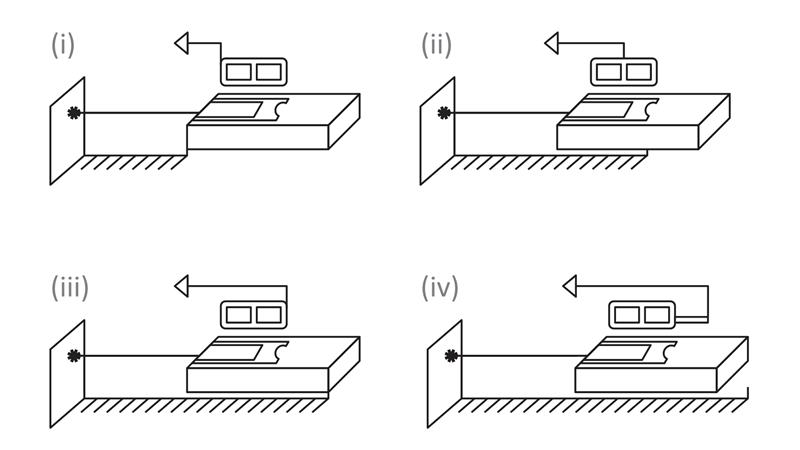
Where you measure from matters, especially in tight spaces or when mounting the device.
Front vs Back Reference Settings
Your laser distance meter can calculate from different starting points:
- Back edge: Ideal when the device is flush against a wall.
- Front edge: Best when measuring across gaps or ledges.
- Corner extension: Used for angled or corner placements on select models.
To change the reference, press the Mode or Reference button until the correct icon appears on screen. Using the wrong setting introduces error. If you’re measuring from the back but the device thinks it’s measuring from the front, your reading will be off by the length of the unit.
Measure Area and Volume Instantly
Skip manual math. Your laser distance meter can calculate area and volume automatically.
Calculate Room Area in Seconds
Use Area mode for flooring, tiling, or drywall estimates:
- Press the Area/Volume button to enter area mode.
- Measure length.
- Measure width.
- The device displays the area automatically.
Most models support adding or subtracting multiple areas. After the first measurement, press ADD, take the next measurement, and the result updates to total area.
Compute Volume for HVAC and Construction
For concrete pours, HVAC airflow, or insulation needs:
- Switch to Volume mode.
- Measure length, width, then height.
- Device returns cubic volume.
All three dimensions must originate from the same corner for accuracy.
Use Continuous Measurement Mode Effectively
Need to scan a space quickly? Continuous mode gives real-time updates as you move.
Track Min and Max Distances
Activate continuous mode by holding the Measure button until a beep sounds. As you pan the device, the current distance updates live while maximum and minimum values are recorded.
Use this to find the highest and lowest points in an uneven ceiling or measure irregularly shaped rooms. Press Measure or Clear to exit and lock the final value.
Pro Tip: Combine with a tripod for smooth scanning and stable readings.
Perform Indirect Measurements with Pythagorean Mode
Cannot reach the top of a wall? Use indirect Pythagorean mode to calculate heights without a ladder.
Measure Height from Floor to Ceiling
Use when standing directly in front of a wall:
- Press Indirect Measurement once.
- Measure the hypotenuse (laser to top corner).
- Measure the horizontal leg (along the floor to wall base).
- Device calculates vertical height automatically.
Keep the device level during the horizontal measurement. If the leg is longer than the hypotenuse, you will see Er.dE (invalid triangle error).
Calculate Height from an Elevated Position
Ideal when measuring from a countertop or platform:
- Press Indirect Measurement twice.
- Measure hypotenuse to ceiling.
- Measure shared horizontal leg to wall base.
- Measure second hypotenuse to floor or countertop.
- Device computes vertical distance between top and bottom.
Small alignment errors can cause approximately 1-inch discrepancies. Practice careful aiming.
Add and Subtract Measurements Onboard
Eliminate the need for a calculator with built-in arithmetic functions.
Combine Multiple Distances
To add wall segments:
- Take first measurement.
- Press + (ADD).
- Take second measurement.
- Display shows the total.
For subtraction, press – (SUBTRACT) after the first measurement, then measure the cutout or opening. These functions work across all modes, including area and volume.
Optimize Accuracy in Challenging Conditions

Even the best laser distance meter struggles in poor environments. Here is how to improve results.
Improve Signal on Difficult Surfaces
Certain materials weaken laser return:
- Dark, porous surfaces like brick or carpet absorb light.
- Reflective surfaces like mirrors scatter the beam.
- Translucent or wet surfaces diffuse the signal.
Solution: Place a laser target plate, white paper, duct tape, or sticky note on the surface. This boosts reflectivity and ensures a strong return signal.
Handle Bright Sunlight Outdoors
Direct sunlight can overwhelm the sensor, especially beyond 30 m. Try these fixes:
- Measure from the shaded side of the structure.
- Use a target plate with retro-reflective coating.
- Enable outdoor mode if available on your model.
Early morning or late afternoon offers better outdoor performance.
Mount and Stabilize the Device for Precision
Handheld use is convenient, but not always accurate.
Use a Tripod for Long-Range Measurements
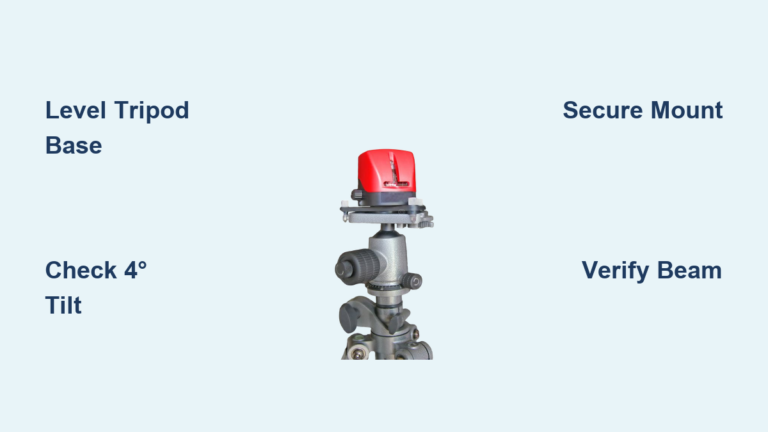
Most laser distance meters have a 1/4″-20 thread for tripod mounting. Benefits include stability for long-range shots, consistent alignment in indirect mode, and hands-free operation outdoors.
Always use a tripod for measurements over 30 ft or in windy conditions.
Enhance Target Visibility
In low light or long distances, use the backlit display, attach a laser target plate, or mark the spot with bright tape.
Warning: Never look directly into the laser beam, even if it is Class 2 (<1 mW).
Calibrate and Verify Accuracy Periodically
Factory-calibrated does not mean forever accurate. Check periodically.
Perform a Simple Calibration Check
- Measure a known distance with a steel tape measure.
- Mark both ends.
- Place LDM at the start point with correct reference setting.
- Aim at the far mark and take a reading.
- Compare results.
If discrepancy exceeds ±2 mm, the device may need servicing. Most consumer models cannot be user-calibrated.
Apply Your Laser Distance Meter in Real Projects
Your laser distance meter excels across many trades.
Interior Use Cases
- Measure room area for flooring or painting estimates.
- Calculate wall surface for drywall or tile.
- Get exact wall lengths for crown molding solo.
- Compute air volume for HVAC duct sizing.
- Plan conduit runs over drop ceilings.
Exterior Applications
- Measure long fence lines quickly.
- Total gutter linear footage.
- Estimate roof slope and peak height.
- Layout patios or decks.
- Measure tree height using the two-triangle method.
Use a tripod and target plate for outdoor precision.
Troubleshoot Common Problems Fast
Fix issues quickly with this reference guide.
No Reading or Weak Signal
Cause: Poor reflectivity or bright ambient light. Fix: Use white paper or target plate. Move to shade.
Er.dE Error Message
Cause: In Pythagorean mode, the leg is longer than the hypotenuse. Fix: Realign and ensure you are measuring perpendicular distances.
Inconsistent Results
Cause: Shaky hand or unstable surface. Fix: Use a tripod or lean against a stable object.
Blank Display
Cause: Dead batteries or auto-shutoff. Fix: Replace batteries. Some models require holding MEAS to restart.
Wrong Units
Cause: Incorrect unit setting. Fix: Press Unit button to cycle to desired format.
Maintain Your Device for Long-Term Reliability
Extend lifespan with proper care.
Clean and Store Properly
- Wipe the lens with a soft, dry cloth.
- Avoid solvents or abrasive materials.
- Store in a protective case.
Battery and Drop Prevention
- Use alkaline or lithium batteries.
- Replace batteries when the low battery symbol appears.
- Most units auto-shutoff after 3 minutes of inactivity.
- Avoid drops. Internal optics are sensitive and can misalign, causing inaccurate readings.
Frequently Asked Questions About Laser Distance Meters
How accurate is a laser distance meter?
Entry-level models offer ±2 mm accuracy up to 40 m, while high-end units reach ±1 mm accuracy at distances up to 200 m. Accuracy depends on proper technique and surface reflectivity.
Can I use a laser distance meter outdoors in sunlight?
Yes, but with limitations. Direct sunlight can overwhelm the sensor. Use a target plate, measure from shaded areas, or enable outdoor mode if your model has it. Early morning or late afternoon provides better results.
What does the Er.dE error mean on my laser distance meter?
This error appears in Pythagorean mode when the horizontal leg is longer than the hypotenuse. Realign your measurements to ensure you are measuring perpendicular distances from a valid triangle.
Can a laser distance meter measure height without a ladder?
Yes. Use Pythagorean (indirect measurement) mode. Measure the hypotenuse to the top corner and the horizontal leg along the floor. The device calculates the vertical height automatically.
How do I measure the distance to a mirror or glass surface?
Place a white target plate, paper, or tape on the surface. Highly reflective surfaces scatter the laser beam, causing inaccurate readings or no reading at all.
Do laser distance meters need calibration?
Most are factory-calibrated. However, verify accuracy periodically against a known distance measured with a physical tape measure. If discrepancy exceeds the manufacturer tolerance, contact the manufacturer for service.
Key Takeaways for Mastering Your Laser Distance Meter
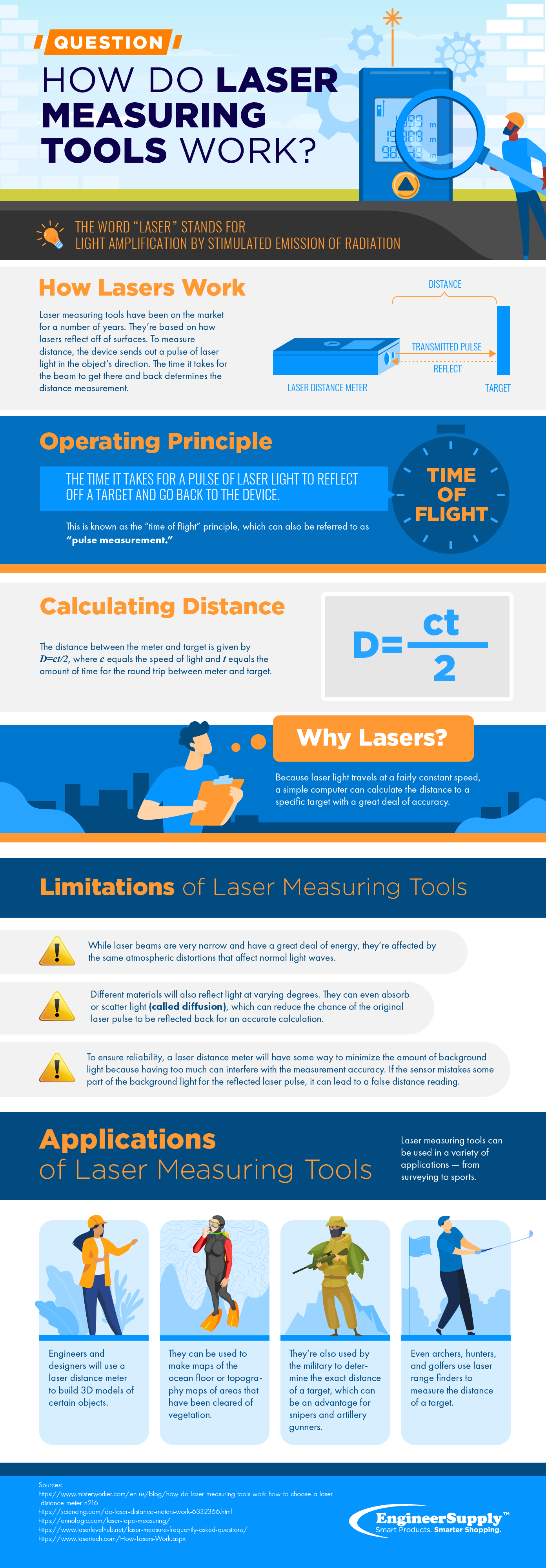
Laser distance meters use time-of-flight technology to deliver fast, precise measurements that traditional tape measures cannot match. The key to accuracy lies in proper setup: always confirm your reference point (front, back, or corner) and unit selection before measuring.
Master the built-in functions first. Area and volume modes eliminate manual math, while Pythagorean mode lets you calculate heights and distances without physical access. These features transform the device from a simple measuring tool into a complete measurement workstation.
For professional results, stabilize your device with a tripod, use target plates on difficult surfaces, and verify critical dimensions with a tape measure. With consistent practice, your laser distance meter becomes an indispensable extension of your workflow, delivering speed, accuracy, and confidence on every job.