How Color Laser Printers Work: Simple Guide
Imagine printing a full-color document in seconds with crisp text, vibrant graphics, and smudge-proof output. That is the power of a color laser printer. But behind that speed and precision lies a complex process called electrophotography, where static electricity, light, and heat work together to fuse powdered toner onto paper four times, once for each color in the CMYK model.
So how do color laser printers work? They rely on an eight-stage electrostatic cycle repeated for each color, using lasers to draw invisible images on charged drums, then attracting toner to those images before transferring and permanently bonding them to paper. This entire process happens in milliseconds with micrometer-level precision to ensure perfect color alignment.
The Electrophotographic Process Explained
Color laser printers do not print in the traditional sense. They build images using static electricity and light through a process called electrophotography (EP). This precise eight-step cycle repeats for each CMYK color, ensuring toner only sticks where intended to create sharp, durable output.
The Eight Stages of Laser Printing
The printer starts with a clean, uniformly charged drum. A laser then writes the image by selectively discharging areas, forming an invisible electrostatic map. Toner is attracted to this map, transferred to paper, and fused with heat. Finally, the drum is cleaned and reset for the next page.
Each stage must be perfectly timed and aligned. Even a 0.1mm shift can cause blurry or rainbow-edged text in color printing. Modern printers achieve this through advanced sensors, high-speed processors, and precision-engineered components.
How Data Becomes a Printable Image
Before any toner hits paper, the printer converts digital data into a printable format. This begins when your computer sends a document using a page description language (PDL) like PCL, PostScript, or OpenXPS.
The printerRaster Image Processor (RIP) then converts this code into a bitmap, which is a grid of dots representing the page at a specific resolution. For color printing, four separate bitmaps are created, one for each CMYK channel.
This requires significant memory. A 300 dpi letter-size page contains approximately 7.56 million dots. Full-color printing at 300 dpi needs at least 4 MB of RAM. High-resolution jobs at 1200 dpi may require 16 MB or more.
Laser Imaging: Writing with Light

Once the drum is charged, the printer uses light to create the image. This is where the laser in laser printer comes into play.
How the Laser Draws the Image
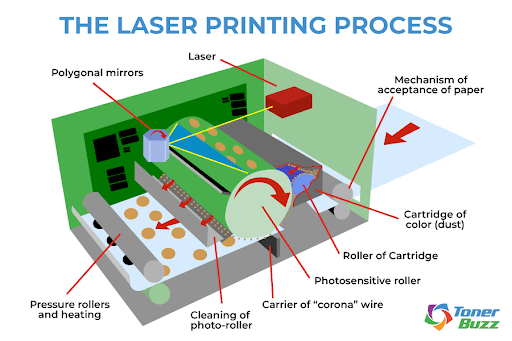
A semiconductor laser diode, typically aluminum gallium arsenide (AlGaAs), emits a red or infrared beam that scans across the drum. The beam is steered by a rotating polygonal mirror and focused through lenses, allowing it to draw the image one line at a time.
Where the laser hits, the organic photoconductor (OPC) material becomes conductive, causing those spots to lose their negative charge. The result is an electrostatic latent image, invisible to the eye but critical for toner attraction.
This process is incredibly fast. Lasers can write up to 65 million pixels per second. Resolution ranges from 600 to 2400 dpi, with high-end models achieving near-photographic detail.
LED Versus Laser Technology
Not all laser printers actually use lasers. Some use LED arrays, which are rows of tiny light-emitting diodes that expose the drum without moving parts.
LED printers have faster warm-up times and are more reliable since there are no rotating mirrors. They are often smaller and cheaper than traditional laser printers. While they lack the extreme precision of high-end laser systems, LED printers deliver excellent quality for most office needs.
Toner Development and Application
Now that the drum holds an invisible image, it is time to make it visible using toner.
Toner Composition and Charging
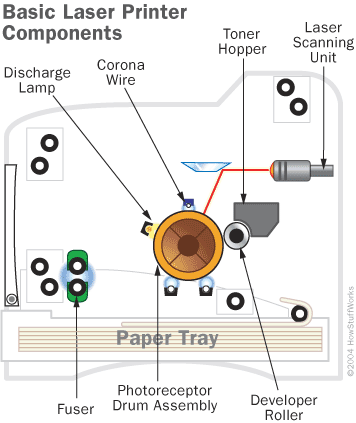
Toner is a fine powder made of plastic resin that melts during fusing, pigments for color, carbon black for black toner, and sometimes iron oxide to aid electrostatic control.
It is stored in a hopper within the toner cartridge. From there, the toner add roller moves it to the developer roller, where a doctor blade ensures a uniform 15-micron layer.
As toner rolls over the developer roller, it gains a negative electrostatic charge. This allows it to be attracted only to the less-negative areas of the drum, the ones discharged by the laser.
Why Toner Sticks Only to the Image
The key is charge contrast. Unexposed drum areas remain negatively charged and repel negatively charged toner. Laser-exposed areas become less negative and attract toner.
This selective adhesion ensures toner forms only the intended image with no smearing or spreading. In color printers, this step repeats for Cyan, Magenta, Yellow, and Black, either on the same drum or separate ones depending on the printer architecture.
Printer Architectures: How Colors Are Applied
Not all color laser printers work the same way. The method used to apply CMYK layers affects speed, accuracy, and cost.
Four-Pass System: One Color at a Time
In four-pass printers, the paper runs through the imaging system four times, once per color. Each pass applies a single CMYK layer. This requires precise paper handling to maintain alignment.
This design is common in budget models. It keeps hardware simple but limits speed and increases the risk of misfeeds due to multiple cycles.
Single-Pass Transfer Belt Systems
Higher-end printers use a rotating transfer belt. Each color is applied sequentially to the belt. The complete CMYK image is then transferred in one step to the paper.
This ensures excellent color registration. It is faster and gentler on paper, making it the dominant system in mid-range and professional color lasers.
Multi-Engine Design for Maximum Speed
Top-tier printers feature four independent print engines, one for each color. Each has its own laser, drum, and toner. Paper moves past them in an assembly line, with all four colors applied in rapid succession.
This delivers maximum speed and accuracy. It is used in commercial printing environments where performance is critical.
Transferring and Fusing the Image
Once toner is on the drum or belt, it must move to paper without smudging.
The Electrostatic Transfer Process
A transfer roller behind the paper applies a strong positive charge. Since toner is negatively charged, it is pulled from the drum onto the paper.
In belt-based systems, the full CMYK image is built on the belt first. A single transfer step moves it all to the paper, reducing mechanical stress.
Precision is critical here. Any misalignment causes color fringing or blurry edges.
Heat and Pressure Bonding
The paper enters the fuser assembly, which contains a heated roller (180 to 200 degrees Celsius) and a pressure roller made of rubber or silicone.
Together, they melt the plastic in the toner, bonding it into the paper fibers. The result is a smudge-proof, durable print.
Industrial printers may use xenon flash lamps for instant fusing at up to 427 degrees Celsius.
A faulty fuser causes problems. If too cold, toner flakes off. If too hot, toner smears or paper scorches. Paper may also stick and cause jams.
Drum Maintenance and the Cleaning Cycle
After transfer, the drum is not done. It must be reset for the next page.
Cleaning Residual Toner
A soft wiper blade scrapes leftover toner off the drum into a waste bin. Excess toner on the developer roller is returned to the hopper for reuse.
This prevents ghosting (faint repeat images), streaks from toner buildup, and contamination of the next print. Over time, the cleaning blade wears out, leading to incomplete cleaning and print defects.
Erasing the Drum Charge
Finally, an erasing lamp (LED or fluorescent) floods the drum with light, neutralizing any remaining electrostatic charge.
This ensures the drum starts each cycle neutral and ready, preventing interference from previous images. The entire cycle can repeat 60 or more times per minute in high-speed printers.
Understanding Color Mixing and Print Quality
Despite using only four colors, laser printers can produce millions of hues.
The CMYK Subtractive Color Model
Laser printers use the subtractive color model. Cyan absorbs red, Magenta absorbs green, Yellow absorbs blue, and Black adds depth and contrast.
Mixing CMY produces a muddy brown, so black is used separately for text and shadows. This is why printers have four cartridges instead of three.
Resolution and Print Quality Metrics
Most color lasers offer 600 by 600 dpi for standard resolution, 1200 by 1200 dpi for high quality, and 2400 dpi for specialized modes.
While excellent for text and graphics, they may struggle with large solid color areas (causing banding) and subtle gradients (showing visible dithering). Inkjet printers often outperform them in photo quality.
Troubleshooting Common Laser Printer Issues
Knowing how color laser printers work helps when something goes wrong.
Blank Pages and Image Problems
If you get blank pages, check these components. No toner means replace the cartridge. A drum not charging indicates a faulty primary charge roller or drum. Laser failure requires professional service.
Run a printer self-test to isolate the issue.
Streaks, Ghosting, and Color Misalignment
Streaks usually mean a dirty or scratched drum. Clean with a lint-free cloth or replace the drum unit. Ghosting suggests incomplete drum cleaning, so the cleaning blade may need replacement.
For color misalignment, run the color calibration utility and clean internal sensors. Check for loose components. Severe misalignment may indicate hardware failure.
Paper Jams and Misfeeds
Paper jams often come from worn pickup rollers. Replace them. Using the wrong paper type causes problems too. Use only laser-rated paper, as inkjet paper may curl or melt in the fuser.
Do not overfill the paper tray. Reduce the load to prevent jams.
Frequently Asked Questions About Color Laser Printers
How does a color laser printer differ from an inkjet printer?
Color laser printers use static electricity and heat to fuse dry toner powder onto paper. Inkjet printers spray liquid ink directly onto paper. Laser printers are faster, more cost-effective for high volume, and produce smudge-proof output. Inkjets typically offer better photo quality and lower upfront costs.
Why do color laser printers need four toner cartridges?
They use the CMYK color model. Each cartridge holds one primary color: Cyan, Magenta, Yellow, or Black. By combining these four colors in varying proportions, the printer can create millions of different hues and shades.
How long does the printing process take?
The complete electrophotographic cycle for one page takes less than a second in high-speed printers. First page out time is typically 10 to 15 seconds due to warm-up, though instant-on fusers can reduce this to under 8 seconds.
Are laser printer outputs waterproof?
Yes. The fusing process melts toner plastic into the paper fibers, creating water-resistant prints. Unlike inkjet output, laser prints will not smudge when exposed to moisture. This makes them ideal for documents that need to withstand handling.
What are those tiny yellow dots on printed pages?
Many color laser printers embed nearly invisible yellow tracking dots on every page. These dots encode the printer serial number, date, and time in binary format. They are used for security and anti-counterfeiting purposes but have raised privacy concerns.
How often should I replace the drum and fuser?
Imaging drums typically last 20,000 to 100,000 pages depending on the model. Fuser units last 75,000 to 150,000 pages. Replace them preventively to maintain print quality and avoid failures.
Key Takeaways on Color Laser Printer Operation
Color laser printers combine physics, chemistry, and precision engineering to deliver fast, durable, and cost-effective printing. From the laser writing the image to the fuser sealing it in place, every step is optimized for reliability and quality.
The eight-stage electrophotographic process ensures accurate color registration through precise timing and alignment. Understanding this helps you choose the right model, maintain it properly, and troubleshoot issues with confidence.
While they are more complex than inkjets, their performance in high-volume environments makes them indispensable in modern offices. They excel at producing sharp text, vibrant graphics, and smudge-proof documents that last.