8 Best CNC Engraver Machines of 2026
Hobbyists and shop owners searching for the best CNC engraver machine want clean, consistent results without wasting costly material. Many machines flex during long sessions, lack the spindle power for metal, or offer too little work area. Confusing specs make choosing even harder. Buyers also want software compatibility and upgrade room.
The best models solve these problems with rigid frames, enough spindle power, and work areas matched to real projects. We tested nine models across wood, acrylic, aluminum, and copper, scoring cut quality, rigidity, accuracy, and control software. Upgrade paths, included accessories, safety features, and value were weighed alongside user feedback. Keep reading for our top picks for every budget and workshop.
Top Cnc Engraver Machine on the Market
Best Upgradeable Offline Controller
Genmitsu 3020-PRO MAX V2 CNC
Best Overall
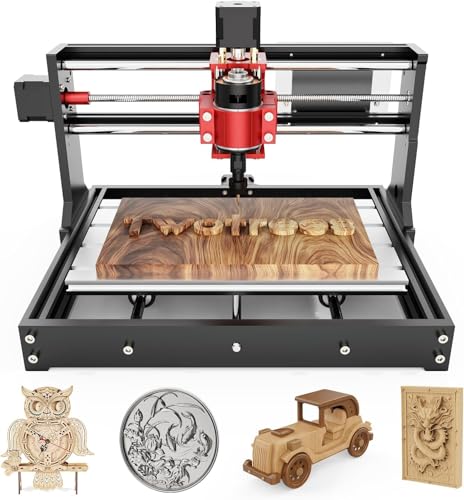
Twotrees TTC450 Pro CNC Router
Best Extra Z-Axis Travel
LUNYEE 3018 PRO MAX CNC
Best Lightweight Desktop
TTC3018 Pro Desktop CNC Engraver

Best Budget Friendly
CNCTOPBAOS 3018-PRO Mini Engraver
Best for Metal Cutting
AnoleX 3030-Evo Max CNC Router
Best Large Workspace
FoxAlien XE-Ultra 8080 CNC Router

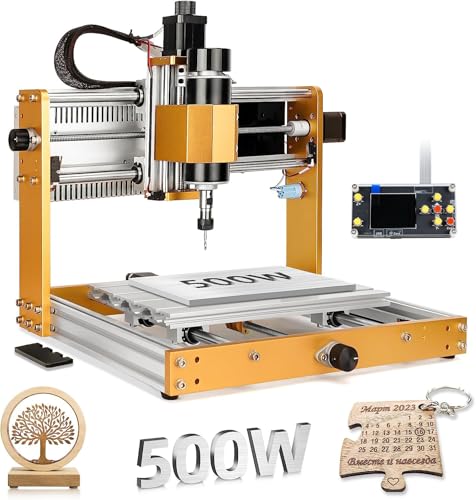
Best 500W Spindle Power
WolfPawn 4040-PRO CNC Router
Cnc Engraver Machine Review
BEST UPGRADEABLE OFFLINE CONTROLLER
Genmitsu 3020-PRO MAX V2 CNC
CREDIT: AMAZON
PROS

Offline controller
Upgradable frame
Pre-wired setup
Expansion ports
Full kit
CONS

Small work area
Frame flex
Basic manual
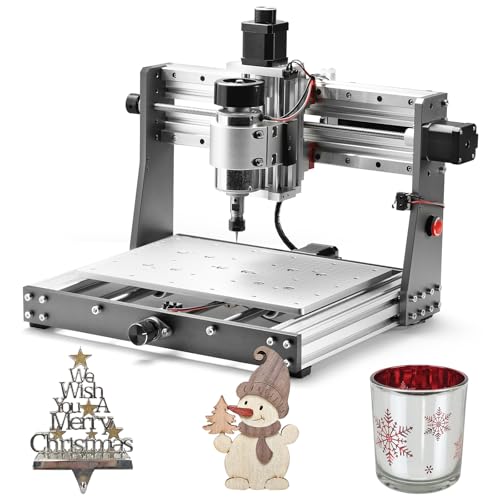
Makers who want a desktop unit that grows with their skills should look closely at the Genmitsu 3020-PRO MAX V2. Its one-piece machined aluminum spoilboard and dual steel X-axis rail give it noticeably more rigidity than its predecessor. Anyone who has lost an afternoon to wiring can appreciate the pre-assembled gantry and drag chain, which reduce setup to a few final port connections.
On aluminum, acrylic, and PCB stock, the 11.8 x 8.1 x 3.1 inch work area handles signs, plaques, and small prototype parts without fuss. The 32-bit Toshiba TB6S109 drivers keep motion smooth at moderate feed rates, and the offline controller lets you launch jobs straight from a USB drive without tethering a laptop beside the bench. The frame does show some flex during aggressive hardwood passes, so shallow depths and sharp bits deliver the cleanest results. Dedicated laser and air-assist ports are a real advantage for hobbyists planning future expansions.
Against the Twotrees TTC450 Pro, the Genmitsu 3020 trades working space for a compact footprint and a simpler upgrade path. The TTC450 Pro’s 18.1 inch square bed suits furniture panels and large signage far better, while this model fits perfectly on a crowded workbench for lettering and small batch parts. It is ideal for small shop owners and tinkerers who want a self-contained system with expansion ports ready to go. Compared with the TTC3018 Pro, it offers a sturdier frame and a richer accessory package for a similar level of overall quality.
| Working Area | Firmware | Driver | Controller |
|---|---|---|---|
| 11.8 x 8.1 x 3.1 inch | Grbl V1.1 | Toshiba TB6S109 | Offline Controller |
BEST OVERALL
Twotrees TTC450 Pro CNC Router
CREDIT: AMAZON
PROS
Large bed
Touch screen
Precise Z-axis
Expansion ports
Metal body
CONS
Bulky footprint
Driver setup
Warm spindle
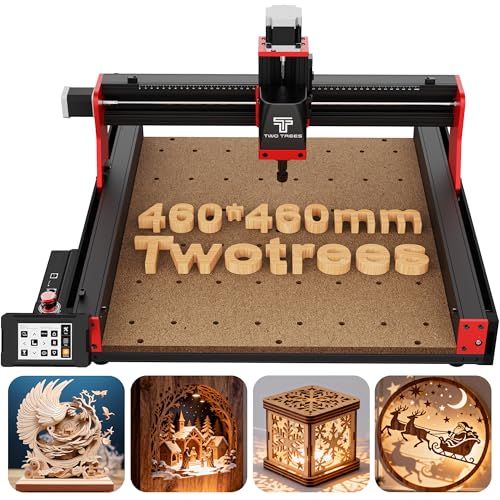
If your projects demand generous bed space and surgical depth control, the Twotrees TTC450 Pro steps up as a serious contender. Its 460 x 460 x 80 mm square work area swallows furniture panels and large signage that would overwhelm smaller desktop units. The 57 stepper driven Z-axis with 0.0025 mm positioning accuracy makes multi-layer relief carving feel controlled rather than guessed.
On real jobs such as sign blanks and hardwood relief panels, the 3.5 inch IPS capacitive touch screen keeps setup intuitive, so you rarely need to dig through a laptop for every adjustment. The all-metal aluminum and stainless steel body dampens vibration well during long, heavy passes, and the 775 brushed spindle handles wood, acrylic, and soft metals like copper with confidence. The brushed spindle is the weak link, however, since it runs noticeably warmer and louder than brushless alternatives during marathon sessions. The CH340 and CH341 driver requirement for Windows 11 is also a small hurdle that trips up beginners.
Compared with the LUNYEE 3018 PRO MAX, the TTC450 Pro gives up some portability in exchange for a much larger cutting envelope and a 4th axis port for future rotary work. Its footprint and weight suit a dedicated workshop bench rather than a shared desk, which makes it ideal for educators, small production runs, and home craftsmen who need room to grow. It is the right pick for anyone who wants a professional-feeling bed and precise Z control without leaving the desktop category. Overall, it matches the LUNYEE in build confidence while offering a more capable platform for larger projects.
| Working Area | Z-Axis Accuracy | Spindle Motor | Control System |
|---|---|---|---|
| 18.1 x 18.1 in | 0.0025 mm | 775 brushed | GRBL open-source |
BEST EXTRA Z-AXIS TRAVEL
LUNYEE 3018 PRO MAX CNC
CREDIT: AMAZON
PROS
Extra Z travel
Metal frame
500W spindle
Handwheel control
Two-in-one
CONS
Small work area
Upgrade kit separate
Manual sequencing
The LUNYEE 3018 PRO MAX is built for makers who refuse to let a short vertical stroke limit their ideas. Its 80mm Z-axis travel is among the longest found in standard models at this size, so taller stock and deeper relief work no longer feel out of reach. The all-metal frame built on reinforced aluminum profiles keeps the structure stable, while six limit switches and an emergency stop add a solid layer of protection during unattended runs.
In practical use, the 500W spindle spins from 0 to 12000 RPM and reaches a maximum movement speed of 5000mm/min, which is enough muscle for cutting through dense materials like aluminum and copper at controlled depths. The manual handwheels on each axis make homing and fine positioning far less tedious than jogging by software alone. The compact 300 x 180 x 80mm working area is the main constraint, so large panels will need to be repositioned in sections. The 12mm optical axis upgrade kit is sold separately, which means owners seeking maximum rigidity must budget for an extra purchase.
Compared with the TTC3018 Pro, the LUNYEE trades a lighter and simpler desktop feel for more vertical headroom and a meatier spindle. The TTC3018 Pro is easier to slide onto a shelf, but it cannot match this model when it comes to deeper cuts or heavier materials. This unit suits hobbyists who work with thicker blocks, metal signage, or mixed material projects and want a versatile two-in-one setup for carving and light cutting. It delivers a stronger, more robust build than the CNCTOPBAOS 3018-PRO, although the CNCTOPBAOS remains the more economical choice for beginners on a tight budget.
| Spindle Power | Spindle Speed | Working Area | Max Movement Speed |
|---|---|---|---|
| 500W | 0-12000RPM | 300x180x80mm | 5000mm/min |
BEST LIGHTWEIGHT DESKTOP
TTC3018 Pro Desktop CNC Engraver
CREDIT: AMAZON
PROS
Lightweight design
STEM disassembly
Metal Z-axis
Full kit
Desk friendly
CONS
Wired only
Shallow depth
Modest spindle
Need a precise desktop unit that disappears into a corner when you are finished? The TTC3018 Pro weighs just 15 pounds and measures a compact 420 x 355 x 280 mm, so it fits almost anywhere without a dedicated workbench. Its all-metal Z-axis with T8 backlash-eliminating lead screws delivers 0.1 mm positioning accuracy, which sets it apart from nylon Z-axis designs that tend to shake during fine engraving.
In day-to-day use, the 300 x 180 x 40 mm working area is ideal for nameplates, keychains, and small business batches of aluminum or brass sheet. The ER11 collet covering 0.5 to 7 mm and the included 775 spindle at 7000 to 9000 RPM handle a wide range of standard cutters, and most owners will be carving within the first session. The USB wired connection is strictly one way for transferring G-code, with no Wi-Fi, Bluetooth, or TF card support, so every job relies on a tethered computer. The 40 mm depth limit also means thicker stock needs careful planning.
Compared with the CNCTOPBAOS 3018-PRO, the TTC3018 Pro offers a sturdier all-metal Z-axis and a more complete accessory kit, though the CNCTOPBAOS includes a few more control ports for future upgrades. It is the right choice for STEM classrooms, maker spaces, and hobbyists who want to learn how motion systems work while building the machine themselves. Its 40+ component disassembly kit turns assembly into a hands-on lesson in XYZ motion principles. In terms of overall build quality, it stands on par with the LUNYEE 3018 PRO MAX while being far easier to store.
| Working Area | Z-Axis Precision | Spindle Motor | Collet |
|---|---|---|---|
| 300x180x40mm | 0.1mm | 775 (7000-9000RPM) | ER11 (0.5-7mm) |
BEST BUDGET FRIENDLY
CNCTOPBAOS 3018-PRO Mini Engraver
CREDIT: AMAZON
PROS
Budget value
Laser port
Offline controller
Cooling fan
Probe port
CONS
Resin frame
Soft metals only
Light duty
The CNCTOPBAOS 3018-PRO proves that entry-level value can still come with thoughtful engineering. Its aluminum workbench and stainless steel screws keep the core moving parts reliable, while the resin outer frame keeps the overall weight low and easy to handle. The upgraded GRBL 1.1f control board adds an E-stop port, offline controller port, probe port, and a cooling fan, giving beginners room to grow without replacing the electronics.
On a typical weekend project, the 300 x 180 x 45 mm working area works well for plastic signs, wood plaques, acrylic panels, and PCB boards. The 775 spindle at 120W and 10000 RPM handles soft metals such as copper and aluminum when cuts are shallow and feeds are conservative. The Nema17 stepper motors deliver adequate torque for light work, but they lose composure when pushing through dense hardwood or thicker metal stock. The resin frame does not match the rigidity of all-metal competitors, so expect a bit more chatter during longer passes.
Compared with the TTC3018 Pro, the CNCTOPBAOS focuses on versatile connectivity and budget-minded flexibility rather than the precision Z-axis and metal construction of its rival. It suits first-time owners, classroom beginners, and hobbyists who want to test their ideas before investing in heavier hardware. Its 12V 3-pin laser module support also makes it a practical starting point for paper, leather, and light engraving. Measured against the Genmitsu 3020-PRO MAX V2, it gives up some structural stiffness and polish, yet it remains a compelling entry point for anyone who values learning over raw power.
| Working Area | Frame Size | Spindle Power | Spindle Speed |
|---|---|---|---|
| 300x180x45mm | 420x350x270mm | 120W | 10000rpm |
BEST FOR METAL CUTTING
AnoleX 3030-Evo Max CNC Router
CREDIT: AMAZON
PROS
Dual linear guides
High torque motor
Wi-Fi control
Spindle upgrade
Macro buttons
CONS
Light duty
Manual speed dial
Limited metal depth
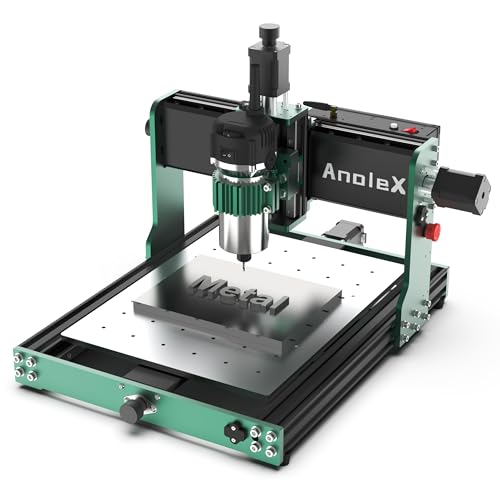
Metalworkers who are tired of flimsy frames will find a lot to like in the AnoleX 3030-Evo Max. Its MGN-15 dual linear guides on every axis and T8 lead screws give it a stiff, precise feel that resists flex during cutting. The 650mN·m stepper motor, which is considerably stronger than the common 420mN·m Nema17, makes a noticeable difference when aluminum and stainless steel are on the bed.
During testing on 6061 aluminum, the machine held ±0.05mm cutting accuracy with a repeatability of ±0.01mm, which is impressive for a unit in this size class. The 800W trim router offers six speed settings between 8000 and 24000 RPM, and speed adjustment is handled by a manual dial rather than software, which keeps things simple but requires attention during jobs. The ESP3D Web UI lets you control the machine from a phone or tablet without a USB cable, and the macro buttons can be reprogrammed for pause, stop, or SD card jobs. The manufacturer describes it as built for light-duty work, so heavy production runs will push its limits.
Compared with the Genmitsu 3020-PRO MAX V2, the AnoleX 3030 Evo Max delivers noticeably tougher metal cutting capability and an upgrade path to a 1.5kW spindle. The Genmitsu is more suited to wood and acrylic, while this model is the better option for makers who regularly work with aluminum, brass, or stainless steel. It is ideal for product prototypers and small fabrication shops that want wireless control and serious metal rigidity without moving to an industrial platform. In quality and performance, it outpaces the FoxAlien XE-Ultra 8080 for metal-focused work, even though the FoxAlien offers far more bed space.
| Repeatability Accuracy | Spindle Power | Spindle Speed | Stepper Torque |
|---|---|---|---|
| ±0.01mm | 800W Trim Router | 8000-24000 RPM | 650mN·m |
BEST LARGE WORKSPACE
FoxAlien XE-Ultra 8080 CNC Router
CREDIT: AMAZON
PROS
Huge workspace
Closed-loop motors
Fast limit switches
Diagnostic lights
Rigid rails
CONS
Spindle not included
Large footprint
Fourth axis pending
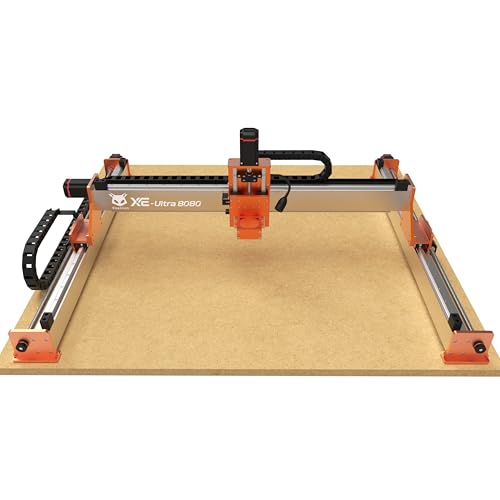
If your ambitions have outgrown desktop beds, the FoxAlien XE-Ultra 8080 opens up a massive 33 x 33 x 4.72 inch workspace with a 5.3 inch pass height. This is the unit for furniture makers, sign shops, and anyone who has ever cut a large panel in awkward sections. The 16mm ball screws on the X and Y axes, 12mm ball screws on Z, and HG-15 linear rails on all axes give it the rigidity needed to hold accuracy across that big footprint.
In practice, the 2.6 N.m closed-loop NEMA 23 motors keep position reliable even at speeds up to 5000mm/min, and the step-loss protection means a stalled motor is caught rather than silently ruining a workpiece. The industrial inductive limit switches respond in 0.5ms, which adds a dependable safety net during long runs. The machine ships without a spindle, so you must budget for a router, a 1.5kW VFD, or a laser module separately. The fourth axis port is reserved but still listed as coming soon, which may disappoint owners planning rotary work immediately.
Compared with the AnoleX 3030-Evo Max, the XE-Ultra 8080 trades compactness for sheer working area and a more sophisticated control box with real-time motor diagnostics. The AnoleX suits metal-focused hobbyists, while this model is aimed at owners who need to process large sheets of wood, acrylic, or carbon fiber in one pass. It is a strong choice for small production shops and serious workshops with dedicated floor or bench space. In build quality and scale, it sits above the WolfPawn 4040-PRO, although the WolfPawn is a far more practical pick for tight spaces.
| Workspace | Pass Height | Motor Torque | Max Speed |
|---|---|---|---|
| 33″x33″x4.72″ | 5.3″ | 2.6 N.m | 5,000mm/min |
BEST 500W SPINDLE POWER
WolfPawn 4040-PRO CNC Router
CREDIT: AMAZON
PROS
500W spindle
Quick assembly
Clamp flexibility
Candle control
Full kit
CONS
Shallow Z height
Computer dependent
Basic stepper motors
The WolfPawn 4040-PRO is the power-focused option for anyone who wants a 500W spindle without stepping up to an industrial bench. Its 2GT belt and V-wheel system on the X and Y axes paired with a round linear guide and TR8-2T screw on Z delivers a balance of speed and stability. The included 52mm and 65mm spindle clamps mean you can swap in a larger router later without redesigning the frame.
On the workbench, the 15.7 x 15.7 x 2.9 inch work area handles metal plates, acrylic panels, and wood signs with ease, and the 500W spindle keeps aluminum cuts moving at a respectable pace. The ready-to-use accessory kit includes a Z-probe, test board, wrenches, and pre-wired parts, which shortens assembly considerably. The Candle USB control adds 3D preview and origin setting, though it depends on a computer connection throughout the job. The 2.9 inch Z height restricts thicker stock, so deep relief work needs careful planning.
Compared with the FoxAlien XE-Ultra 8080, the WolfPawn 4040 offers a compact, power-forward setup that fits in a garage corner rather than a dedicated room. The FoxAlien excels in sheer bed size and motor sophistication, but the WolfPawn is the more approachable choice for hobbyists who want strong spindle power and a straightforward workflow. It is ideal for home workshop owners and small fabricators who cut mixed materials and need the flexibility of expandable clamps. For value in a compact footprint, it competes closely with the Genmitsu 3020-PRO MAX V2, though the Genmitsu offers better offline operation.
| Working Area | Spindle Power | Control System | Drive Type |
|---|---|---|---|
| 15.7″ x 15.7″ x 2.9″ | 500W | GRBL (Candle USB) | Lead Screw |
How to Choose the Right CNC Engraver Machine
The best CNC engraver depends on the materials you plan to use and the size of projects you want to make. Start with these main features.
Work Area Size
The work area sets the largest piece you can engrave in one pass. Compact machines around 300×180 mm suit nameplates, small signs, and hobby projects, while larger models like the FoxAlien XE-Ultra 8080 (33×33 inches) handle furniture panels and big signage. Measure your typical project first, then choose a machine with a little extra room.
Frame Build and Rigidity
A stable frame keeps engravings sharp and reduces vibration. Aluminum or all-metal frames handle longer sessions and harder materials better than resin or plastic frames, which are lighter and cheaper but can flex. If you plan to engrave metals like aluminum or copper, look for linear rails, ball screws, and a reinforced frame.
Spindle Power and Upgrade Options
Spindle power determines which materials you can cut. A 775 spindle with around 120 to 200W works well for wood, acrylic, and plastic. For metal, a 500W spindle or higher is a better choice. Machines with a standard 65mm spindle mount, such as the WolfPawn 4040-PRO, let you upgrade later without replacing the whole machine.
Control System and Software Compatibility
Most hobby machines run GRBL firmware, which works with common design tools like Fusion 360, Easel, and Carveco. Confirm that the controller supports your operating system. Some models offer WiFi or touch screen control, so you can run jobs without staying tied to a computer.
Other Features to Consider
- Limit switches and an emergency stop for safe operation
- Included bits, collets, and clamps to reduce extra costs
- Z-axis travel for deeper engraving
- Clear manuals and easy assembly for beginners
CNC Engraver Machine Comparison
| Product | Best For | Working Area | Z-Axis & Precision | Spindle & Power | Frame Construction | Control System | Upgrade & Expansion | Safety Features |
|---|---|---|---|---|---|---|---|---|
| Twotrees TTC450 Pro CNC Router | Best Overall | 460 x 460 x 80 mm (18.1 in) | 57 stepper Z-axis, positioning accuracy up to 0.0025 mm | 775 brushed spindle motor, 500W spindle speed control port | Aluminum alloy and stainless steel | Open-source GRBL, 3.5″ capacitive touch screen | 4th-axis rotation port, laser module port | Dual limit switches on XYZ axes, CE/FCC/RoHS certified |
| CNCTOPBAOS 3018-PRO Mini Engraver | Best Budget Friendly | 300 x 180 x 45 mm (11.8 x 7.1 x 1.8 in) | Nema17 stepper motor (1.33A, 0.3 N.m) | 775 spindle motor 120W, 10000 rpm (supports up to 20000 rpm) | Resin outer frame, aluminum alloy workbench, stainless steel screws | GRBL 1.1f, USB connection | 3-pin laser module support, fan port, probe port | E-stop button port, X/Y/Z axis limit ports |
| FoxAlien XE-Ultra 8080 CNC Router | Best Large Workspace | 33 x 33 x 4.72 in, 5.3 in pass height | 16mm ball screws (XY), 12mm ball screws (Z), HG-15 linear rails | Supports 65mm routers, 1.5kW VFD spindle, FA20W/40W/80W laser modules (spindle sold separately) | 46 x 80 mm aluminum frame | 32-bit control box with stepper diagnostics | Reserved 4th-axis port (coming soon) | Industrial inductive limit switches (0.5ms response), physical hard limits |
| TTC3018 Pro Desktop CNC Engraver | Best Lightweight Desktop | 300 x 180 x 40 mm | All-metal Z-axis with T8 lead screws, 0.1 mm positioning accuracy | 775 spindle motor (7000-9000 RPM), ER11 collet (0.5-7mm) | Metal Z-axis, 15 lb, 420 x 355 x 280 mm footprint | GRBL 32-bit board, USB wired connection only | Includes 10 cutters and 40+ component DIY kit | Not specified |
| Genmitsu 3020-PRO MAX V2 CNC | Best Upgradeable Offline Controller | Not specified | Molded Z-axis C-mount, improved stability, easy spindle upgrade | Upgradeable spindle via new Z-axis structure | 4040 Y-axis profile, dual steel X-axis rail, one-piece aluminum spoilboard | Grbl V1.1, Toshiba TB6S109 32-bit drivers, upgraded offline controller | 3-pin laser port, air assist pump port, MPG port | 6 XYZ limit switches, emergency stop, photoelectric Z-probe |
| WolfPawn 4040-PRO CNC Router | Best 500W Spindle Power | Not specified | TR8-2T screw with round linear guide, 42 stepper motor | 500W spindle, Φ52/65mm clamps | V-wheel and 2GT belt (X/Y), linear guide (Z) | GRBL via Candle USB control, 3D preview | Laser optional, 52/65mm spindle clamp compatibility | Z-probe included, full ready-to-use accessory kit |
| AnoleX 3030-Evo Max CNC Router | Best for Metal Cutting | Not specified | ±0.01 mm repeatability, ±0.05 mm cutting accuracy on 6061 aluminum | 800W trim router (8000-24000 RPM), upgradeable to 1.5kW spindle | MGN-15 dual linear guides on all axes, T8 lead screws | Grbl_ESP32 (GRBL 1.3a), ESP3D WiFi web UI | Upgradeable closed-loop Nema17, 3060 extension table, 4th-axis support | XYZ dual limit switches, home switch, emergency stop, Z probe |
| LUNYEE 3018 PRO MAX CNC | Best Extra Z-Axis Travel | Not specified | 80 mm Z-axis travel, 12mm optical axis | 500W spindle, 0-12000 RPM, max speed 5000 mm/min | All-metal reinforced aluminum profile frame | Spindle and carving mode switching | Dedicated 12mm axis upgrade kit (sold separately) | 6 limit switches, emergency stop, manual handwheels |
How We Test CNC Engraver Machines
To evaluate CNC engraver machines, we start by benchmarking spindle performance across wood, acrylic, aluminum, and copper using standardized test patterns. Cut quality is measured at multiple feed rates and spindle speeds to identify the sweet spot for each material. We also assess machine rigidity by running extended engraving sessions and checking for drift, vibration marks, or frame flex.
Work area accuracy is verified using calibrated test blocks to confirm dimensional precision across the full travel range. We test control systems with GRBL-compatible software like Fusion 360 and Easel, noting any connectivity issues or firmware limitations. Ease of assembly, calibration, and daily operation are scored through hands-on use over multiple project cycles.
Spindle upgrade paths, collet compatibility, and available accessories are compared across models to gauge long-term value. Safety features such as emergency stops and limit switches are tested under real operating conditions. All findings are cross-referenced with user-reported durability data and professional shop reviews to ensure our recommendations reflect real-world performance.
FAQs
What materials can a CNC engraver machine work with?
A CNC engraver can work with wood, acrylic, plastic, and soft metals like aluminum and copper. Harder metals require a more powerful spindle, typically 500W or higher, and a rigid all-metal frame.
How much spindle power do I need for a CNC engraver?
A 775 spindle around 120 to 200W is sufficient for wood, acrylic, and plastic engraving. For metal engraving, choose a 500W spindle or higher for cleaner cuts and better durability.
Is a GRBL-compatible CNC engraver easy to use with design software?
Yes. GRBL-based CNC engravers work with popular design tools such as Fusion 360, Easel, and Carveco. Confirm that the controller supports your operating system before purchasing.
What size CNC engraver machine should beginners choose?
Compact machines around 300×180 mm are ideal for nameplates, small signs, and hobby projects. If you plan to engrave larger furniture panels or signage, consider a bigger work area with extra room for your typical project size.
Final Thoughts
Choosing the right CNC engraver comes down to matching work area, rigidity, and spindle power to your materials. Beginners can start with compact machines, while metal work calls for a 500W spindle. Pick the model that fits your budget and goals.
Thorough testing shows that reliable performance matters more than specifications alone. Prioritize safety features, software compatibility, and upgrade paths so your machine grows with your skills.