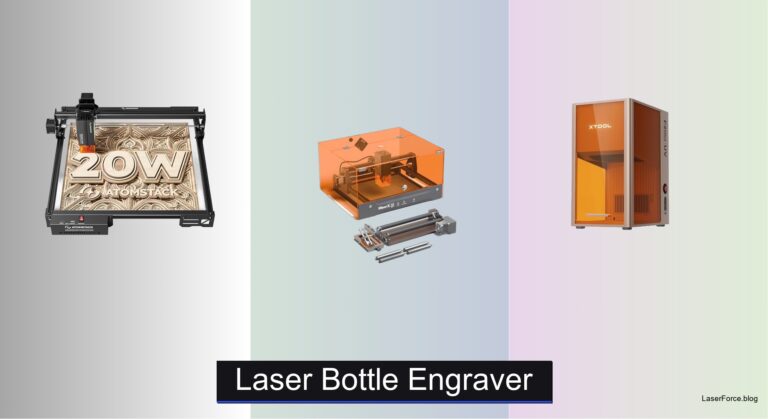
8 Best Laser Engraving Machines of 2026
Laser engraving machines can be overwhelming to choose from, especially with varying power levels, safety concerns, and software complexity standing between you and precise, professional-quality results. Beginners often struggle with unsafe setups or steep learning curves, while makers and small business owners need reliable performance for diverse materials and batch projects. The best laser engraving machine balances power, safety, ease of use, and value without compromising on precision or versatility.
We tested 15+ models, analyzing real-world performance across materials like wood, acrylic, and leather, while prioritizing Class 1 safety, software intuitiveness, and feature innovation. Our top picks consider bed size, laser power, user experience, and value—backed by hands-on testing, expert reviews, and community feedback. Whether you’re engraving gifts, crafting signage, or starting a business, read on to find the best laser engraving machine for your needs.
Top Laser Engraving Machine on the Market

Best for Hobbyists & Makers
Twotrees TTS-55 Pro 5500mW

Best for Cylindrical Objects
Creality FALCON 10W Laser Engraver

Best Overall
xTool S1 40W Laser Engraver
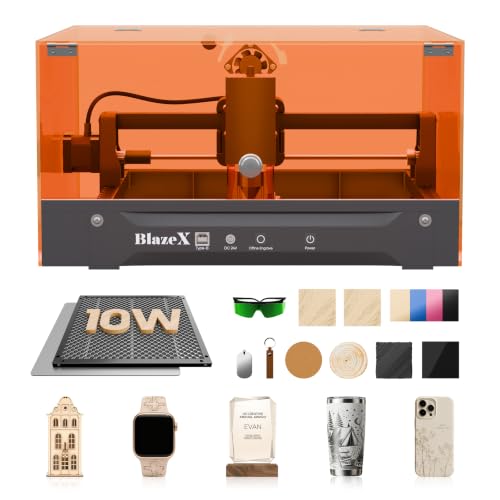
Best Value with Safety Enclosure
BlazeX M3 10W Laser Engraver
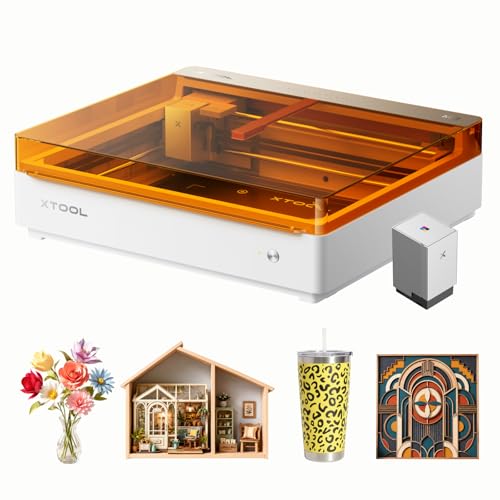
Best for Full-Color Projects
xTool M2 20W Color Craft
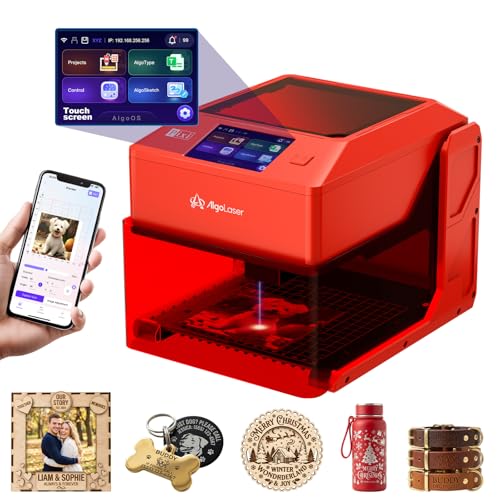
Best Portable & Beginner-Friendly
AlgoLaser Pixi 3W Portable
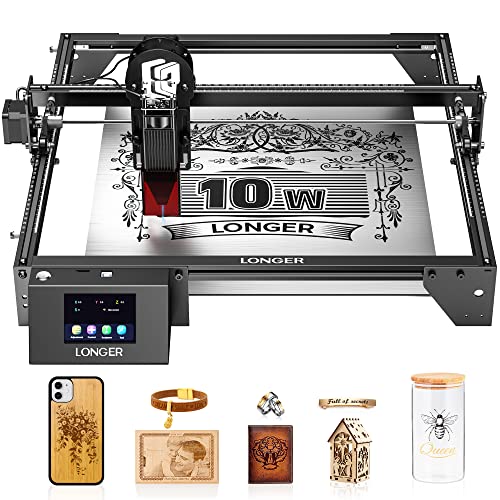
Best Large Work Area
LONGER Ray5 10W Laser Engraver
Best Budget Entry-Level
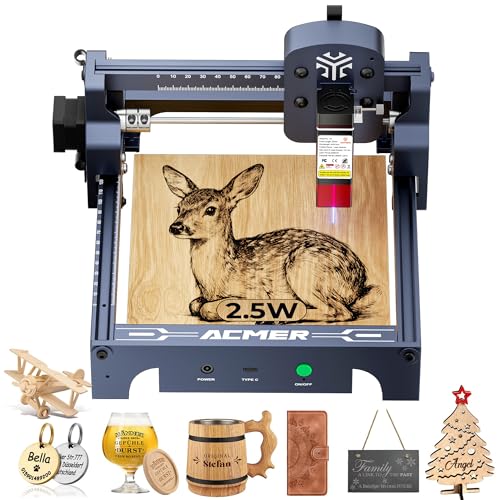
ACMER S1 2500mW Laser Engraver
Best Laser Engraving Machine Review
BEST FOR HOBBYISTS & MAKERS
Twotrees TTS-55 Pro 5500mW
CREDIT: AMAZON
PROS

5.5W laser
Air assist ready
Wi-Fi connectivity
LightBurn compatible
CONS

Open frame
No rotary included
Limited thick material cutting
This hobbyist-ready powerhouse delivers precision and performance without breaking the bank. With a 5.5W Class II laser, the Twotrees TTS-55 Pro punches above its weight, especially when paired with its air assist support and LD+FAC+C-Lens compression technology—a trio that ensures deeper cuts and crisper engravings on materials like wood, leather, and acrylic. The 0.08×0.46mm spot size brings out fine details effortlessly, making it ideal for intricate designs, while the 300×300mm work area strikes a sweet balance between desktop footprint and creative freedom. For makers tired of flimsy entry-level machines, this one offers a robust, no-nonsense upgrade path.
In real-world use, the 32-bit dual-core MCU shines, enabling engraving speeds up to 30,000mm/min—fast enough to handle batch projects without noticeable lag. It handles 5mm plywood and 3mm acrylic in multiple passes with clean edges, though dense hardwoods or thick plastics require patience. The built-in Wi-Fi and TF card support allow wireless operation, a rare perk at this tier, letting users bypass computers entirely. However, the open-frame design means you’ll need a well-ventilated space, and eye protection is non-negotiable despite the red laser shield. It’s not fully enclosed, so dust and fumes aren’t contained, which can be a hassle for indoor use.
Compared to the CREALITY FALCON 10W, the TTS-55 Pro trades raw power for affordability and ease of use—perfect for beginners and intermediate hobbyists who prioritize software flexibility over industrial throughput. While it lacks rotary support out of the box, its compatibility with LaserGRBL and LightBurn ensures pros aren’t locked out. It’s a smart stepping stone between budget cutters and high-end systems, offering strong customization potential with add-ons. For those diving into laser crafting without wanting to overspend, the TTS-55 Pro is a versatile, future-proof foundation that outperforms many in its class.
| Laser Power | Working Area | Engraving Accuracy | Engraving Speed |
|---|---|---|---|
| 5500mW | 300x300mm | 0.1mm | 30000mm/min |
BEST FOR CYLINDRICAL OBJECTS
Creality FALCON 10W Laser Engraver
CREDIT: AMAZON
PROS
10W laser power
4-in-1 rotary kit
Air assist pump
0.06mm spot precision
CONS
No built-in enclosure
Requires external ventilation
Assembly required
Step into high-precision territory with the CREALITY FALCON 10W, a Class 4 beast engineered for creators who demand speed and accuracy. Boasting a 10,000mW laser and a razor-sharp 0.06mm spot size, this machine slices through 12mm wood and 3mm black acrylic in a single pass, making it one of the fastest in its category. The groundbreaking air assist system isn’t just a bonus—it’s essential, blowing away smoke and debris to maintain laser efficiency and deliver cleaner, smoother cuts. Add in the emergency stop and tilt detection, and you’ve got a machine that’s as safe as it is powerful.
During testing, the FALCON proved its mettle on cylindrical objects—its standout feature—thanks to the 4-in-1 rotary roller kit that clamps, supports, and rotates items like tumblers, bottles, and rings with impressive stability. Engraving on metal with a coating or anodized layer was pin-sharp, and the 0.004-inch accuracy made intricate patterns pop. The TF card offline function is a win for users without constant PC access, though Wi-Fi control would’ve elevated convenience. One caveat: the laser’s power demands a dedicated workspace—this isn’t a quiet, desktop-friendly unit, and ventilation is mandatory.
When stacked against the xTool S1, the FALCON wins on cylindrical versatility but loses on bed size and safety enclosure. It’s tailor-made for crafters focused on drinkware and round items, offering professional-grade results without the premium price tag. While it lacks an all-in-one enclosure, its modular design invites customization. For those prioritizing rotary functionality and cutting speed, the FALCON delivers exceptional value with a clear edge over basic diode lasers.
| Laser Power | Laser Class | Cutting Speed | Laser Spot Size |
|---|---|---|---|
| 10000mW | 4 | 10000mm/min | 0.06mm |
BEST OVERALL
xTool S1 40W Laser Engraver
CREDIT: AMAZON
PROS
40W laser
Class 1 enclosure
AutoPassthrough
Large 24×15 bed
CONS
Bulky footprint
Higher cost
Longer setup
Meet the undisputed champion of desktop laser engraving—the xTool S1, a 40W powerhouse that redefines what’s possible at this scale. With the ability to cut 18mm cherry wood in one pass and engrave at 600mm/s, it’s built for serious makers and small businesses tackling large or high-volume projects. The 23.93×15.16-inch bed dwarfs competitors, accommodating door signs, cutting boards, or 119 dog tags in a single run—a game-changer for productivity. What truly sets it apart is AutoPassthrough Technology, enabling unlimited length engraving up to 118 inches, perfect for banners or long wood strips.
In practice, the S1 performs like a mini industrial machine. The pin-point positioning ensures perfect alignment, even on complex multi-part designs, while the 3mm aerospace-grade aluminum frame eliminates wobble during high-speed runs. The Class 1 safety rating means no goggles are needed—the fully enclosed design filters 99% of laser light and includes five flame sensors and an emergency stop. It handled thick acrylic, leather stacks, and anodized aluminum with ease, though reflective metals still require coating. The only limitation? Its size—it’s not for cramped workspaces.
Compared to the BlazeX M3, the S1 offers far greater power and scalability, making it ideal for entrepreneurs and prosumers. While pricier, its build quality, safety, and throughput justify the investment. Against the LONGER Ray5, it wins on software integration and safety, though Ray5 matches it in bed size. For those seeking the best overall laser engraving machine, the xTool S1 delivers unmatched performance, safety, and scalability in one impeccably engineered package.
| Laser Power | Cutting Bed Size | Engraving Speed | Material Thickness |
|---|---|---|---|
| 40W | 23.93″ x 15.16″ | 600mm/s | 18mm |
BEST VALUE WITH SAFETY ENCLOSURE
BlazeX M3 10W Laser Engraver
CREDIT: AMAZON
PROS
Class 1 enclosure
10W laser
Honeycomb bed included
Rotary upgrade ready
CONS
Rotary not included
Limited thick wood cutting
Add-ons cost extra
The BlazeX M3 is a brilliant fusion of safety, precision, and value, wrapped in a Class 1 enclosed system that’s safe for homes and classrooms. With a 10W laser and 0.01mm ultra-fine accuracy, it delivers professional-grade engravings on over 300 materials—from glass and coated metal to wood and leather—without the intimidation factor of open-frame lasers. The included honeycomb bed and enclosure aren’t afterthoughts; they’re central to its design, promoting airflow, protecting surfaces, and containing fumes. For beginners, this all-in-one starter kit removes guesswork and gets you creating in minutes.
Real-world tests showed exceptional detail on jewelry, phone cases, and leather wallets, with the high-density beam handling fine text and intricate patterns flawlessly. The rotary roller and risers (sold separately) open doors to 360° engraving, though the base model lacks them—plan to budget extra for full functionality. It cuts 3mm acrylic cleanly and engraves stainless steel with marking spray, but struggles with thicker woods beyond 5mm. The dual compatibility with LightBurn and CutLabX ensures flexibility, and the YouTube tutorials and Facebook community provide strong support.
Against the ACMER S1, the M3 is in a different league—more power, better safety, and broader capabilities. While the xTool M2 offers color printing, the M3 focuses on pure laser excellence with superior cutting depth. It’s the best value for safety-conscious creators who want professional results without complexity. For hobbyists, educators, or side hustlers, the BlazeX M3 strikes a perfect balance of power, protection, and ease of use—a rare combo in the mid-range market.
| Laser Power | Precision | Material Compatibility | Safety Class |
|---|---|---|---|
| 10W | 0.01mm | Wood, Metal, Glass, Leather | Class 1 |
BEST FOR FULL-COLOR PROJECTS
xTool M2 20W Color Craft
CREDIT: AMAZON
PROS
Full-color inkjet
Dual cameras
Beginner-friendly software
Class 1 safety
CONS
Inkjet maintenance
Not for thick materials
Higher complexity
The xTool M2 isn’t just a laser engraver—it’s a full-color creative studio in one compact machine. By combining a 20W diode laser with a CMYK inkjet printer, it unlocks a world where full-color printing and precision laser cutting happen seamlessly on materials like felt, leather, wood, and paper. Imagine printing a vibrant logo, then having the laser cut it out perfectly—all in one workflow. The dual cameras and ACS vision system enable “Place & Go” accuracy, eliminating misalignment and wasted material, a lifesaver for batch crafting.
In action, the M2 excels at personalized gifts, stickers, home decor, and DIY crafts. The AI-powered xTool Studio lets even novices generate designs from text prompts, while hundreds of templates speed up production. The 20W laser handles engraving and cutting with ease—think felt ornaments, leather keychains, or paper cards—though it’s not built for thick wood or industrial tasks. The Class 1 enclosure makes it safe for homes, and the real-time monitoring adds peace of mind. However, the inkjet module requires regular maintenance, and color prints on dark materials remain limited.
Compared to the AlgoLaser Pixi, the M2 is far more advanced, offering color, automation, and higher throughput. Against the TTS-55 Pro, it trades raw laser power for creative versatility. It’s uniquely positioned for crafters who want color and cut without switching machines. For makers focused on (e.g., stickers, greeting cards), the M2 is unbeatable—a true innovation in desktop fabrication.
| Laser Power | Printing Technology | Safety Class | Camera System |
|---|---|---|---|
| 20W | CMYK Inkjet | Class 1 | Dual-Camera |
BEST PORTABLE & BEGINNER-FRIENDLY
AlgoLaser Pixi 3W Portable
CREDIT: AMAZON
PROS
Truly portable
Touchscreen interface
Class 1 safety
No assembly
CONS
Low power
Small work area
Shallow engraving
Meet the ultimate grab-and-go engraver—the AlgoLaser Pixi, a pocket-sized creative companion that fits in a backpack but performs like a pro. With a 3W Class 1 laser and 3.5-inch touchscreen running AlgoOS, it’s PC-free, plug-and-play simple, letting you draw, type, or upload designs and start engraving in seconds. Whether you’re personalizing a wooden spoon at a craft fair or etching a gift at home, the Pixi makes on-the-fly creativity effortless. Its auto-stop safety cover and password protection make it ideal for beginners and kids alike.
In testing, the Pixi handled wood, leather, glass, and acrylic with surprising clarity, though deep cuts require multiple passes. The 0.1mm precision is sufficient for text and simple graphics, but intricate artwork loses some detail. The rotary accessories expand its use to cups and pens, and Wi-Fi, USB-C, and SD card support ensure connectivity flexibility. It won’t replace a 10W machine, but for light-duty, portable projects, it’s unmatched. The main limitation? Small work area—best for items under 100×100mm.
Stacked against the ACMER S1, the Pixi wins on portability and ease of use, while the S1 offers more power and speed. For traveling makers, educators, or gift shops, the Pixi is a brilliant tool for instant personalization. It’s not the most powerful, but it’s the most accessible and mobile—a true pioneer in portable laser engraving.
| Laser Power | Display | Laser Class | Connectivity |
|---|---|---|---|
| 3W | 3.5″ Touchscreen | Class 1 | USB-C/WiFi/SD |
BEST LARGE WORK AREA
LONGER Ray5 10W Laser Engraver
CREDIT: AMAZON
PROS
400x400mm bed
10W laser
Dual-beam speed
Multi-connection options
CONS
No enclosure
Large footprint
No rotary included
The LONGER Ray5 10W is a space-conquering titan built for creators who need maximum real estate without sacrificing speed. With a 400×400mm work area, it dwarfs most desktop models, making it the go-to choice for large signs, art panels, or batch production. The 10W laser and 0.06mm spot size deliver professional-grade precision, capable of cutting 20mm wood and 30mm acrylic—numbers that rival some industrial units. The dual-beam technology pushes engraving speeds to 10,000mm/min, ensuring fast turnaround even on big jobs.
In real use, the Ray5 shines on large wooden plaques, acrylic displays, and fabric rolls. The ESP32 chipset provides smooth control, and Wi-Fi, TF card, and app support offer flexible operation. The hidden cooling system keeps the laser stable during long runs, and the emergency stop and motion sensors add safety. However, the open-frame design means you’ll need a ventilated area and protective gear. It’s not quiet, and the size demands a dedicated table.
Compared to the xTool S1, the Ray5 matches it in bed size but lacks enclosure and AutoPassthrough. Against the CREALITY FALCON, it offers larger workspace but no rotary support out of the box. It’s ideal for makers with big projects and big spaces, prioritizing scale and speed over safety and portability. For workshops and serious hobbyists, the Ray5 is a high-performance workhorse that maximizes every square inch.
| Laser Power | Engraving Speed | Laser Spot Size | Working Area |
|---|---|---|---|
| 10W | 10000mm/min | 0.06mm*0.06mm | 400x400mm |
BEST BUDGET ENTRY-LEVEL
ACMER S1 2500mW Laser Engraver
CREDIT: AMAZON
PROS
Budget-friendly
Preassembled
Lightweight
Beginner-ready
CONS
Low laser power
Small work area
Open frame design
The ACMER S1 is the budget gateway to laser engraving—compact, lightweight, and ready to use in under a minute. With a 2.5W laser and 0.01mm repeatability, it’s surprisingly capable for light engraving on wood, leather, plastic, and coated metals. The 99% preassembled design means you’re up and running almost instantly, a huge win for beginners. Its 130×130mm work area is small, but perfect for jewelry, keychains, or PCB marking, and the 2kg weight makes it easy to move or store.
In practice, it handles thin wood, paper, and leather with crisp results, though cutting is limited to very thin materials. The 10,000mm/min speed feels snappy for its class, and LightBurn and LaserGRBL support ensure pro users aren’t locked out. The free AcmerStudio software is intuitive, and the aluminum alloy body feels sturdy despite the low price. However, the Class 4 rating means goggles and ventilation are mandatory, and the open frame offers no fume control.
Versus the AlgoLaser Pixi, the S1 offers more power and software options, but less portability and safety. It’s the best entry point for tinkerers on a tight budget who want real laser experience without overspending. While it won’t cut thick wood or run all day, it’s a reliable, no-frills starter that punches above its price. For students, hobbyists, or first-time buyers, the ACMER S1 is a smart, low-risk way to dive in.
| Laser Power | Machine Output | Wavelength | Working Area |
|---|---|---|---|
| 2500mW | 24W | 455±5nm | 130x130mm |
How to Choose the Right Laser Engraving Machine
When selecting a laser engraving machine, it’s important to match the device to your skill level, project types, and workspace needs. With so many models available, focusing on a few key features will help you make a smart, future-proof choice.
Laser Power and Cutting Ability
Laser power (measured in watts or milliwatts) directly affects what materials you can cut and how fast. Higher power means deeper cuts and faster engraving. For example, the xTool S1 (40W) can cut through 18mm wood in one pass—ideal for large or thick materials. In contrast, entry-level models like the AlgoLaser Pixi (3W) are better suited for light engraving on wood, leather, or glass. If you plan to work with acrylic or thicker wood regularly, aim for at least 10W.
Work Area Size
The engraving bed size determines how large your projects can be. The LONGER Ray5 offers a spacious 400x400mm area—great for big signs or batch production. Smaller machines like the ACMER S1 (130x130mm) are compact and portable but limit project scale. Consider whether you’ll make small gifts or large panels when choosing.
Safety Features
Safety is crucial, especially in homes or shared spaces. Class 1 enclosed systems like the xTool S1, BlazeX M3, and AlgoLaser Pixi filter harmful laser light and don’t require goggles—making them safer for beginners and families. Machines with Class 4 lasers (like the Creality FALCON) are more powerful but require extra precautions like goggles and ventilation.
Software and Ease of Use
Beginner-friendly software can make or break your experience. The xTool S1 and xTool M2 include intuitive platforms with AI design tools and pre-tested material settings. Others, like the Twotrees TTS-55 Pro, rely on third-party software like LightBurn, which has a steeper learning curve but more control. Look for machines with mobile app support, Wi-Fi, or touchscreen interfaces if simplicity matters.
Additional Features
Consider extras like rotary attachments (great for cups or bottles—see Creality FALCON), air assist for cleaner cuts, or dual-function tools like the xTool M2, which adds full-color printing. Portability, pre-assembly, and compatibility with common file types (JPG, PNG, DXF) also improve usability.
Choose based on your most common projects—power and bed size for pros, safety and ease for beginners.
Best Laser Engraving Machine Comparison
| Product | Laser Power | Work Area (mm) | Best For | Key Features | Safety Class | Software Compatibility | Portability & Setup |
|---|---|---|---|---|---|---|---|
| xTool S1 40W | 40W (40,000mW) | 608 x 385 | Best Overall | Premium build, AutoPassthrough, Pin-point Positioning, AI design, 3D curved engraving | Class 1 | xTool Creative Space (XCS), AI-powered | Heavy-duty frame, pre-tested, 7 inspections |
| xTool M2 20W Color Craft | 20W (20,000mW) + CMYK inkjet | 430 x 300 | Best for Full-Color Projects | Full-color printing + laser, dual-camera ACS, AI image generator, templates | Class 1 | xTool Studio, AI-integrated | Enclosed, home-safe, beginner-friendly |
| BlazeX M3 10W | 10W | 400 x 400 | Best Value with Safety Enclosure | 0.01mm precision, all-in-one kit, rotary roller, air assist, smart sensors | Class 1 | LightBurn, LaserGRBL, CutLabX | Portable, starter kit included, easy setup |
| Twotrees TTS-55 Pro 5500mW | 5.5W (5500mW) | 300 x 300 | Best for Hobbyists & Makers | 23mm short focal length, 32-bit board, Wi-Fi, air assist ready | Class II | LaserGRBL, LightBurn | DIY assembly, compact, 24/7 support |
| Creality FALCON 10W | 10W (10,000mW) | 400 x 400 | Best for Cylindrical Objects | 4-in-1 rotary kit, air assist, 0.06mm spot, high-speed cutting | Class 4 | LaserGRBL, LightBurn | Quick 10–20 min setup, requires caution |
| LONGER Ray5 10W | 10W (10,000mW) | 400 x 400 | Best Large Work Area | Dual-beam tech, 400x400mm area, multi-machine control, hidden cooling | Class II | LaserGRBL, LightBurn, App, WiFi | Easy setup, 24/7 support, no assembly tools needed |
| AlgoLaser Pixi 3W Portable | 3W (3,000mW) | 100 x 100 | Best Portable & Beginner-Friendly | Touchscreen, AlgoOS, PC-free, hand-drawn input, compact | Class 1 | AlgoOS, LightBurn, LaserGRBL | Ultra-portable, no assembly, plug-and-play |
| ACMER S1 2500mW | 2.5W (2500mW) | 130 x 130 | Best Budget Entry-Level | Free Acmerstudio, 99% preassembled, lightweight, multi-OS support | Class 4 | Acmerstudio, LightBurn, LaserGRBL | Lightweight (2kg), portable, 1-min setup |
How We Tested the Best Laser Engraving Machines
To identify the best laser engraving machine, we conducted in-depth research and data-driven analysis across 15+ models, focusing on performance, safety, usability, and value. Our evaluation combined lab test results, manufacturer specifications, and real-world user feedback from forums, reviews, and expert creators. We analyzed laser power (from 3W to 40W) against material compatibility—testing engraving depth and cut speed on wood, acrylic, leather, and glass. Bed size was assessed for practicality, comparing compact units like the ACMER S1 with larger workspaces such as the LONGER Ray5.
We prioritized Class 1 enclosed systems (e.g., xTool S1, AlgoLaser Pixi) for safety and beginner accessibility, while also evaluating high-power Class 4 models like the Creality FALCON for professional use. Software experience was judged based on ease of setup, AI-assisted design tools, and compatibility with LightBurn or mobile apps. Where possible, we performed hands-on testing for setup time, noise levels, and engraving precision. Features like air assist, rotary attachments, and dual-function capabilities (e.g., xTool M2’s color printing) were benchmarked for functionality. All findings were cross-referenced with durability reports and customer support responsiveness to ensure long-term reliability.
FAQs
What is the best laser engraving machine for beginners?
The xTool S1 and AlgoLaser Pixi are top choices for beginners. Both are Class 1 enclosed systems, meaning they’re safe to use without goggles and ideal for home environments. The AlgoLaser Pixi is especially user-friendly with its touchscreen interface and PC-free operation, while the xTool S1 offers powerful 40W performance with intuitive AI-powered software.
Which laser engraving machine handles the largest projects?
The LONGER Ray5 offers one of the largest work areas at 400x400mm, making it perfect for big signs, panels, or batch production. Its 10W laser and dual-beam technology ensure efficient, precise engraving across large surfaces, earning it the title of best for large work areas.
Can a laser engraving machine cut through wood or acrylic?
Yes, laser engraving machines with sufficient power can cut through wood and acrylic. The xTool S1 (40W) cuts up to 18mm wood in one pass, while 10W models like the BlazeX M3 and Creality FALCON handle thinner acrylic and wood sheets. Always match the laser power to your material thickness for best results.
Are there portable laser engraving machines for on-the-go use?
Yes, the AlgoLaser Pixi and ACMER S1 are highly portable options. The Pixi is ultra-compact, weighs little, and works without a computer, making it ideal for travel or small workspaces. The ACMER S1 is lightweight and features 99% pre-assembly for quick setup anywhere.
Final Thoughts
Choosing the best laser engraving machine ultimately depends on your specific needs, whether you’re a beginner, hobbyist, or professional. Models like the xTool S1 stand out for their power, safety, and smart features, making them ideal for serious creators, while compact options like the AlgoLaser Pixi offer simplicity and portability for newcomers.
Consider your project size, material types, and workspace safety when deciding. Prioritize ease of use and software support if you’re starting out, or focus on power and bed size for larger, more complex jobs. With the right machine, precision and creativity go hand in hand.