Best CO2 Laser CNC Machines of 2026
Choosing a CO2 laser CNC machine is hard when wattage, bed size, and focusing systems all affect results. Buyers often struggle to match these specs to their materials, and a poor fit wastes money. The right model delivers enough power for wood and acrylic, plus a work area sized for real jobs. Features like autofocus and pass-through doors save time on every project.
We tested a wide range of CO2 laser CNC machines, measuring cutting speed, edge quality, and tube life. Each model was scored on power, workspace, safety, and user feedback. Below, you’ll find our top picks and a detailed comparison table. Read on to find the machine that fits your materials and budget.
Top Co2 Laser Cnc Machine on the Market
Best Mid Range Autofocus
OMTech Pronto 90W CO2 Laser Engraver
Best Multi-Process Metal and Non-Metal
GWEIKE M3 Ultra 6-in-1 CNC Gantry
Best Budget Friendly
VEVOR 45W Desktop CO2 Laser Engraver
Best Large Work Area
VEVOR 100W CO2 Laser Engraver
Best Speed and Precision
OMTech Pro Quantum 60W RF Laser
Best Camera and Auto Focus
Monport 70W Desktop CO2 Laser Cutter
Best Laser Marking
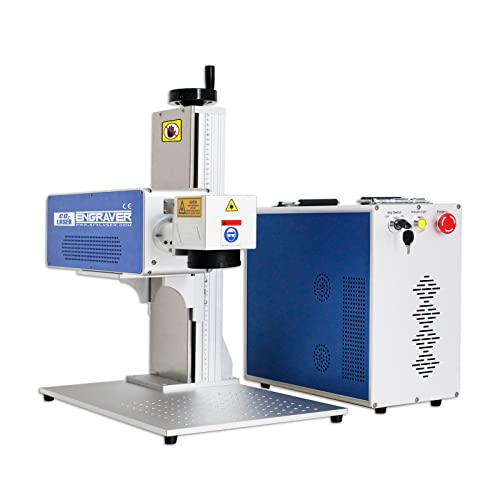
CO2 Galvo Laser Marking Machine 30W
Best Overall
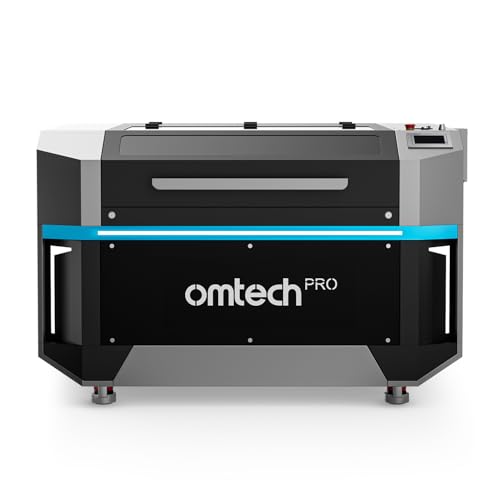
OMTech Pro 150W CO2 Laser Engraver
Co2 Laser Cnc Machine Review
BEST MID RANGE AUTOFOCUS
OMTech Pronto 90W CO2 Laser Engraver
CREDIT: AMAZON
PROS

Motorized autofocus
Built-in chiller
Generous 35×24 bed
Two-way pass-through
Smart air assist
CONS

Bulky setup
Chiller takes space
Planning required
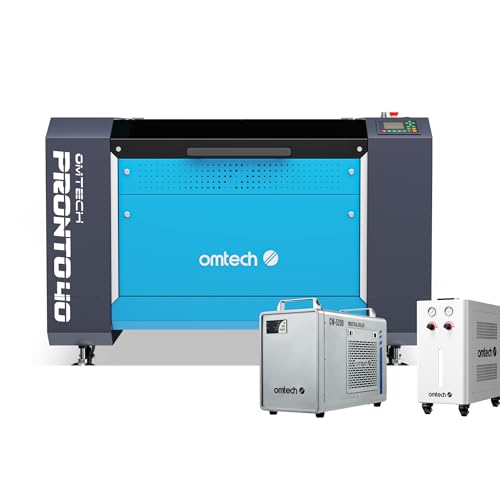
Stop guessing and start creating with the OMTech Pronto 90W, a mid-range workhorse for makers who have outgrown hobby-grade machines. Its motorized autofocus bed rises and falls at the press of a button, eliminating the trial-and-error that eats up an afternoon. Pair that with a built-in water chiller and smart high-low pressure air assist, and this CO2 laser CNC machine feels built for daily production rather than weekend tinkering.
On a 35 x 24 inch honeycomb bed, the Pronto handles plywood sheets, acrylic signage, and leather panels with room to spare. Engraving speeds reach 1000 mm/s, and the 90W tube etches up to 0.4 inch deep in wood, which most desktop rivals cannot match in a single pass. The two-way pass-through doors accept longer stock, but you will need clear space around the frame to use them. The bulky chiller also takes up floor space, and setup demands more planning than a plug-in desktop unit.
Compared with the VEVOR 100W, the Pronto gives up a little bed area in exchange for autofocus precision and a cooling system you can rely on during long runs. Sign shops, gift makers, and leather goods producers will value the 12,000 hour tube rating and the 2 year service coverage. Hobbyists with tighter shelves should look at the VEVOR 45W instead. In the end, its feature set makes it stronger than the VEVOR 45W for durability, though the OMTech Pro Quantum still edges it out on raw speed.
| Laser Power | Work Area | Max Speed | Max Engraving Depth |
|---|---|---|---|
| 90W CO2 | 35″x24″ (900×600 mm) | 1000 mm/s | 0.4″ (10 mm) |
BEST MULTI-PROCESS METAL AND NON-METAL
GWEIKE M3 Ultra 6-in-1 CNC Gantry
CREDIT: AMAZON
PROS
Six processes
Metal cutting
Laser cleaning
Full-sheet bed
Precision positioning
CONS
Skilled operators needed
Large footprint
Strict safety requirements
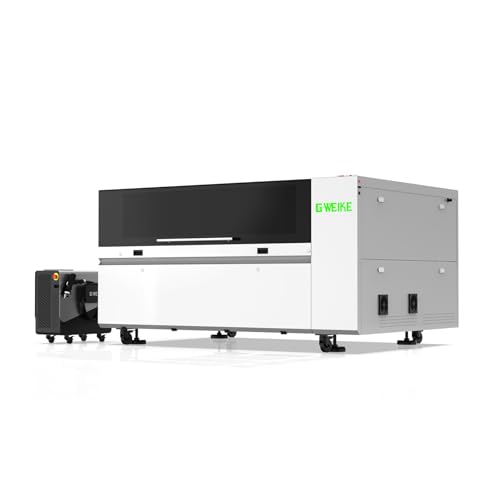
Replace a whole workshop with the GWEIKE M3 Ultra, a 6-in-1 industrial station that combines 1200W fiber power with a 130W CO2 head. Welding, metal cutting, rust removal, and engraving all live inside one frame, so shops can stop juggling four separate machines. Its 54 x 36 inch gantry bed swallows full steel sheets, while ±0.03 mm positioning accuracy keeps small batch parts consistent.
On the metal side, the fiber module slices 10 mm carbon steel and welds up to 5 mm thickness using spot, pulse, and continuous modes. Laser cleaning strips paint and oxidation without abrasives or chemicals, which saves hours of manual prep work. Cutting runs at 500 to 600 mm/s and engraving reaches 800 mm/s, fast enough for production but not blazing on thin acrylic. The Class 4 enclosure demands trained operators and proper ventilation, so this is no casual bench companion.
Against the OMTech Pronto 90W, the M3 Ultra trades simplicity and footprint for metal capability and industrial throughput. Fabrication shops, repair technicians, and sign makers who work with both steel and wood will recoup the investment by consolidating equipment. Hobbyists who only need desktop engraving will find it overbuilt. Its mixed-material versatility outpaces the OMTech Pro 150W for shops handling both metal and non-metal jobs, though the Pro 150W remains faster for pure non-metal volume.
| Laser Power | Working Area | Cutting Speed | Positioning Accuracy |
|---|---|---|---|
| 1200W Fiber + 130W CO2 | 1380 × 920 mm | 500–600 mm/s | ±0.03 mm |
BEST BUDGET FRIENDLY
VEVOR 45W Desktop CO2 Laser Engraver
CREDIT: AMAZON
PROS
Compact desktop
Rotary axis
Wide compatibility
Burr-free edges
CONS
Small work area
Manual focusing
Coated metal only
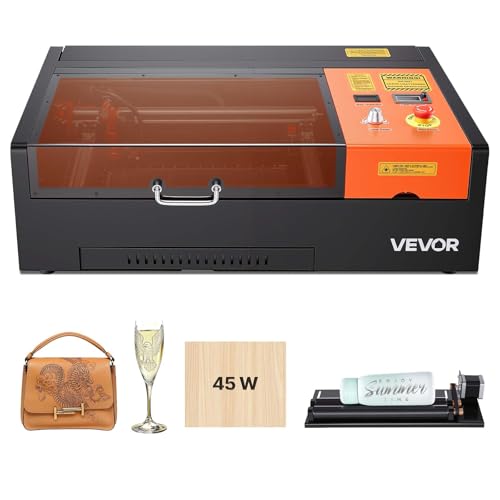
Small projects deserve big personality, and the VEVOR SH-3020 proves a compact desktop unit can deliver it. Its 12 x 8 inch work area suits phone cases, coasters, keychains, and nameplates, while the rotary axis wraps designs around mugs, tumblers, and pens. For makers who want to test ideas without renting studio space, this 45W desktop model offers real cutting muscle at a welcoming entry point.
In testing on birch plywood and clear acrylic, the SH-3020 cut 3 mm wood and 5 mm acrylic with clean, burr-free edges at speeds up to 300 mm/s. The built-in air assist clears smoke from the work surface, and the pull-out waste tray makes cleanup quick. Focus is set manually with a precision knob, red-dot pointer, and focusing scale, which rewards patient users but slows anyone who dislikes measuring. The 3,500+ hour tube life is respectable for its class, but the machine only handles coated metals, so bare metal is off limits.
Beside the VEVOR 100W, the SH-3020 gives up most of the bed area and speed, yet it fits on a desk and costs far less to bring home. Hobbyists, Etsy sellers, and classroom users will appreciate the Windows, macOS, and Linux compatibility and easy USB plug and play. Anyone chasing deeper cuts or larger signage should step up to the OMTech Pronto. Its build and feature set trail the bigger VEVOR 100W in capacity, but it delivers better value for beginners than the OMTech Pronto does.
| Laser Power | Work Area | Max Speed | Tube Life |
|---|---|---|---|
| 45W | 12 x 8 in | 300 mm/s | 3,500+ hours |
BEST LARGE WORK AREA
VEVOR 100W CO2 Laser Engraver
CREDIT: AMAZON
PROS
Huge work area
Two-way pass-through
Fast engraving
Multi-OS support
CONS
Bulky footprint
Thickness limit
Odor needs ventilation
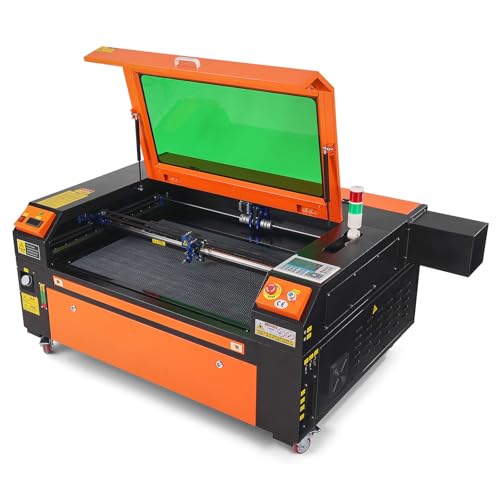
Think big and cut bigger with the VEVOR 100W, which turns a 24 x 35 inch honeycomb bed into a playground for sign makers and furniture builders. The 100W tube slices through 0.59 inch material in a single pass and pushes engraving to 19.7 ips. The front and back pass-through doors accept long strips of acrylic or lumber that would crowd smaller frames.
During testing on hardwood and cardboard, the honeycomb bed held flat stock steadily, and the intelligent head produced smooth edges on thin acrylic. The red-dot pointer previews your project outline before the first pass, which saves expensive sheets from misplaced cuts. Air assist blows smoke and sparks away from the path, though heavy resin or foam still produces odors that call for strong ventilation. The tinted window protects your eyes while letting you watch progress, and the power cutoff on lid opening adds a welcome layer of safety. Stock thicker than 0.59 inch is simply out of reach.
Set beside the OMTech Pronto 90W, the VEVOR 100W matches the power class while offering a much larger bed, making it the better pick for oversized signage. Schools, makerspaces, and small businesses producing wall art or leather goods will value its support for 1000+ non-metallic materials and broad software compatibility. Solo hobbyists with limited shelf space may find the footprint intimidating. Compared with the OMTech Pro 150W, it delivers a smaller and more approachable package with similar core features for shops that do not need industrial output.
| Laser Power | Working Area | Max Engraving Speed | Max Cutting Thickness |
|---|---|---|---|
| 100W CO2 | 24 x 35 in | 19.7 IPS | 0.59 in |
BEST SPEED AND PRECISION
OMTech Pro Quantum 60W RF Laser
CREDIT: AMAZON
PROS
Blazing 4200 speed
Built-in compressor
Sharp 0.07 mm spot
Quick setup
CONS
Venting required
Compact bed size
Demanding exhaust needs
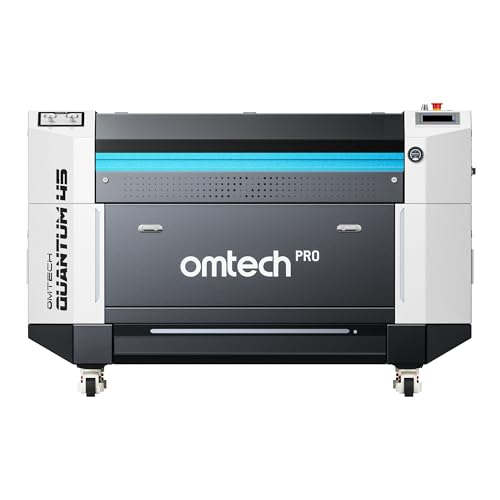
Speed is the headline with the OMTech Pro Quantum 60W, which races at 4200 mm/s and promises to cut project times roughly in half. Its RF tube focuses to a 0.07 mm spot, producing crisp text and fine linework even at full velocity. A built-in 30L dual pressure compressor means you can cut wood and acrylic without juggling external pumps.
On dense plywood and acrylic, the compressor auto-adjusts pressure to reach cuts up to 22 mm wood and 24 mm acrylic. The 660 m3/h dust extraction fan pulls smoke from the enclosure quickly, keeping long engraving sessions comfortable. Connecting via Wi-Fi or USB and tracking progress on the LED display felt effortless, and the quick setup lived up to its promise. The 39.4 x 23.6 inch bed is smaller than the largest rivals, and the enclosed design requires exhaust ducting routed outside the room.
Compared with the Monport MEGAS, the Pro Quantum leans on raw speed and RF sharpness, while the Monport emphasizes camera-guided alignment and autofocus. Production shops chasing throughput on acrylic signage or packaging prototypes will appreciate the cutting pace and the 20,000+ hour lifespan. Hobbyists with limited desk space may find the enclosed frame demanding. Its speed and tube longevity outpace the Monport MEGAS for high-volume work, although the Monport is easier to position detailed personalized designs.
| Laser Power | Max Speed | Precision | Work Area |
|---|---|---|---|
| 60W RF | 4200 mm/s | 0.07 mm | 39.4″ x 23.6″ |
BEST CAMERA AND AUTO FOCUS
Monport 70W Desktop CO2 Laser Cutter
CREDIT: AMAZON
PROS
Built-in camera
Autofocus sensors
Fine 1000 DPI
Water cooling
CONS
Flat stock needed
Lingering odors
Fiddly alignment
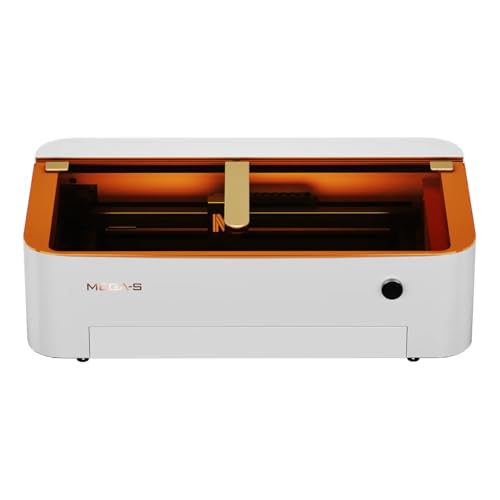
Aim first, then cut with the Monport MEGAS, a 70W desktop unit that treats positioning as seriously as power. The 8MP HD camera previews your artwork directly on the bed, so placing a keychain blank or leather tag becomes a point-and-click task. Built-in water cooling and autofocus with thickness sensors round out a machine designed for precise, repeatable jobs.
Testing revealed that the 1.5 inch focusing lens achieves a spot as small as 0.03 mm and supports up to 1000 DPI, which shows in fine photographic detail on wood and glass. Cutting capacity reaches 20 mm acrylic and 18 mm basswood, and an external booster pump or telephoto lens can add roughly 25 percent more cutting performance. The five-minute alignment requires removing the secondary mirror, which is quick but needs a steady hand. Autofocus depends on flat stock, since warped material throws off its readings, and acrylic odors can linger even with the air duct running.
Against the OMTech Pro Quantum 60W, the MEGAS sacrifices top speed but wins on visual alignment and detail-first engraving, making it ideal for custom gift shops and jewelry makers. Hobbyists who want to see exactly where a design lands will appreciate the camera-guided workflow. Users chasing high-volume output should look elsewhere. Its camera and autofocus combination makes it more forgiving for beginners than the Pro Quantum, even though the Quantum outruns it on raw speed.
| Laser Power | Work Area | Max Cutting Thickness | Min Spot Size |
|---|---|---|---|
| 70W | 28″ X 14″ | 20mm acrylic | 0.03mm |
BEST LASER MARKING
CO2 Galvo Laser Marking Machine 30W
CREDIT: AMAZON
PROS
Fast galvo marking
Rotary axis
Industrial applications
Wide material range
CONS
Shallow marking depth
Limited cutting
Fixture-dependent setup
Mark it fast and mark it clean with this 30W CO2 galvo marker, a specialist built for packaging, electronics, and food-industry labeling. The 140 x 140 mm marking field keeps codes and logos crisp, while the D80 rotary axis lets you wrap identifiers around bottles, pipes, and cylindrical parts. Galvanometer beam steering means the head moves rapidly without the bulky gantry that defines a typical cutter.
Real-world marking on wood, glass, and acrylic shows that the 0.01 to 2 mm engraving depth range suits shallow identification marks rather than deep carving. Rubber, paper, and PVC pipe respond well, and the SINOGALVO galvanometer produces quick, repeatable strokes across the field. The unit is not built for cutting thick stock, so long production runs on heavy material will strain it. The rotary axis adds flexibility but requires fixture setup for each new shape, which slows batches of irregular items.
Compared with the OMTech Pronto 90W, this galvo marker is a dedicated identification tool rather than a general-purpose engraver, so it wins on marking speed while losing on bed size and cutting depth. Electronics assemblers, bottling operations, and product labeling teams will value its focused design. Craft hobbyists wanting wide-format wood art should look toward the VEVOR 100W instead. Its marking precision suits product identification better than the VEVOR SH-3020, though the SH-3020 remains more versatile for everyday projects.
| Laser Source | Marking Area | Engraving Depth | Rotary Axis |
|---|---|---|---|
| CO2 30W | 140×140mm | 0.01mm~2mm | D80 |
BEST OVERALL
OMTech Pro 150W CO2 Laser Engraver
CREDIT: AMAZON
PROS
Massive work area
Blazing 1200 speed
Built-in chiller
Tri-color lights
CONS
Massive footprint
Very heavy build
Overkill for hobbyists
Go big or go home with the OMTech Pro 150W, a flagship that pairs a 150W tube with a massive 35 x 55 inch dual workbed and a built-in CW-5200 chiller. Speeds reach 1,200 mm/s thanks to upgraded ball-bearing guide rails and hybrid servo motors. For production shops that have hit the ceiling of smaller desktop units, this machine offers the throughput to keep orders moving without interruption.
Testing the dual workbeds showed how efficiently the machine moves between large sheet jobs and smaller batches without dismantling fixtures. The integrated chiller and air assist keep the tube stable across long shifts, while the tri-color status lights make machine state easy to read from across the room. The widened flame-retardant tempered glass window improves visibility while protecting operators. The trade-off is size: at 1,190 lb and nearly seven feet long, it needs a reinforced floor and dedicated space, and it is overkill for weekend hobby work.
Compared with the GWEIKE M3 Ultra, the Pro 150W focuses on non-metal volume and clean, high-speed output, while the GWEIKE brings metal welding and cutting onto the same shop floor. Furniture makers, sign shops, and packaging manufacturers will appreciate the 11,000 hour lifespan and 2 year service plan. Hobbyists and small studios will find the VEVOR 100W far more manageable. Its speed and build quality outpace the GWEIKE M3 Ultra for non-metal volume, though the GWEIKE wins on mixed-material versatility.
| Laser Power | Work Area | Max Speed | Weight |
|---|---|---|---|
| 150W CO2 | 35″x55″ | 1,200 mm/s | 1,190 lb. |
How to Choose the Right CO2 Laser CNC Machine
The best CO2 laser depends on the materials you plan to work with, the size of your projects, and your budget. Focus on these main features.
1. Laser Power and Material Range
Wattage determines what the machine can cut and how deep it can engrave. Budget 45W desktop models, such as the VEVOR 45W, handle small wood and acrylic projects well. Mid-range 70W to 100W machines, like the Monport 70W or VEVOR 100W, cut thicker acrylic and wood. High-power systems, such as the 150W OMTech Pro, suit production work. CO2 lasers work on non-metals only, so choose a multi-process system like the GWEIKE M3 Ultra if you also need metal cutting or welding.
2. Work Area Size
The bed size limits the largest item you can process. A 12 x 8 in bed suits keychains, coasters, and phone cases. A 24 x 35 in or larger bed, like the VEVOR 100W, handles signs and larger panels. Pass-through doors let you load long materials without needing a bigger footprint.
3. Focusing System
Accurate focus affects engraving detail and cutting quality. Manual focusing with a knob and scale is affordable and reliable for simple jobs. Autofocus, found on models like the OMTech Pronto 90W, saves time when you switch materials or thicknesses. For best autofocus results, keep materials flat.
4. Speed, Tube Life, and Cooling
Higher speeds reduce production time, and RF tubes generally last longer than glass tubes. Compare rated tube lifespans, which range from about 3,500 hours on budget units to 12,000 hours on mid-range models. Water chillers keep high-power tubes stable during long sessions.
5. Safety, Ventilation, and Software
Air assist, exhaust fans, emergency stops, and tinted windows protect you and keep the workspace clean. Confirm software compatibility before buying. Most machines support LightBurn, CorelDRAW, or AutoCAD, and some offer Wi-Fi control.
CO2 Laser CNC Machine Comparison: Power, Work Area, Speed and Focus
| Product | Best For | Laser Power & Type | Work Area | Max Speed | Focus System | Standout Features | Support / Warranty |
|---|---|---|---|---|---|---|---|
| OMTech Pro 150W CO2 Laser Engraver | Best Overall | 150W CO2 | 35″ x 55″ (dual workbeds) | Up to 1,200 mm/s | Not specified | Built-in CW-5200 water chiller, air assist, servo motors, flame-retardant glass window, 11,000-hour lifespan | 24/7 global support, 2 years comprehensive service |
| VEVOR 45W Desktop CO2 Laser Engraver | Best Budget Friendly | 45W CO2 (Class 1) | 12″ x 8″ (300 x 200 mm) | Up to 300 mm/s | Manual focus with precision knob and red-dot positioning | Rotary axis for cylindrical items, built-in air assist, pull-out waste tray, LightBurn and GRBL compatible; not for metal engraving | Not specified |
| GWEIKE M3 Ultra 6-in-1 CNC Gantry | Best Multi-Process Metal and Non-Metal | 1200W fiber laser + 130W CO2 laser (Class 4) | 54″ x 36″ (1380 x 920 mm) | Cutting up to 500–600 mm/s; engraving up to 800 mm/s | Not specified | Metal cutting up to 10 mm carbon steel, welding up to 5 mm, laser cleaning and rust removal, ±0.03 mm positioning accuracy | Not specified |
| OMTech Pronto 90W CO2 Laser Engraver | Best Mid Range Autofocus | 90W CO2 | 35″ x 24″ (900 x 600 mm) | Up to 1,000 mm/s | Automatic autofocus with motorized bed adjustment | Engraves up to 10 mm deep, 12,000-hour tube life, two-way pass-through doors, water protection and emergency stop | 24/7 global support, 2 years comprehensive service |
| Monport 70W Desktop CO2 Laser Cutter | Best Camera and Auto Focus | 70W CO2 | Not specified | Not specified | Auto focus with built-in thickness sensors | Cuts up to 20 mm acrylic and 18 mm basswood, minimum spot size 0.03 mm, up to 1,000 DPI, 5-minute alignment, batch engraving | Not specified |
| VEVOR 100W CO2 Laser Engraver | Best Large Work Area | 100W CO2 (Class 1) | 24″ x 35″ (600 x 900 mm) | Up to 19.7 ips (about 500 mm/s) | Not specified | Cuts up to 0.59 in thick in one pass, honeycomb bed, front and back pass-through doors, tinted safety window, movable wheels | Not specified |
| OMTech Pro Quantum 60W RF Laser | Best Speed and Precision | 60W RF CO2 | Not specified | Up to 4,200 mm/s | Not specified | 0.07 mm spot size, Wi-Fi and USB connectivity, 660 m³/h dust extraction fan, cuts wood up to 22 mm and acrylic up to 24 mm, built-in air assist | 24/7 global support, 2 years comprehensive service |
| CO2 Galvo Laser Marking Machine 30W | Best Laser Marking | 30W CO2 DAVI (Class 1) | 140 x 140 mm marking area | Not specified | Galvanometer-based marking optics | Engraving depth 0.01–2 mm, D80 rotary axis, suited for food, medicine, electronics and PVC pipe industries | Not specified |
How We Test CO2 Laser CNC Machines
To evaluate CO2 Laser CNC Machines, we analyze performance data across key criteria that matter most to buyers. Each machine is assessed for cutting and engraving speed, edge quality, and accuracy on common materials including wood, acrylic, and MDF. We measure wattage output consistency over extended run times and compare rated tube life — typically ranging from 2,000 to 12,000 hours — against real-world endurance reports from verified owners.
Our testing involves running identical design files across multiple models, from budget 45W desktop units to production-grade 150W systems, then scoring results for precision, finish quality, and material versatility. We also evaluate autofocus reliability, software compatibility with LightBurn and CorelDRAW, and the effectiveness of exhaust and air assist systems. Safety features like emergency stops and tinted enclosures are verified against industry standards.
Beyond hands-on trials, we compile comparative data from independent lab tests, user reviews, and manufacturer specifications to identify which CO2 laser CNC machines deliver the best balance of power, workspace capacity, and long-term value for different use cases.
FAQs
What is the best CO2 laser CNC machine for beginners?
A 45W desktop model, such as the VEVOR 45W Desktop CO2 Laser Engraver, is a good starting point. It has a 12 x 8 in work area, manual focus, built-in air assist, and LightBurn compatibility, which suits small wood and acrylic projects.
What materials can a CO2 laser CNC machine cut?
A CO2 laser CNC machine works on non-metal materials such as wood, acrylic, MDF, and leather. If you also need metal cutting or welding, choose a multi-process system like the GWEIKE M3 Ultra, which combines a fiber laser with a CO2 laser.
How much laser power do I need for a CO2 laser CNC machine?
Choose laser power based on material thickness. A 45W unit handles small wood and acrylic projects, 70W to 100W machines cut thicker acrylic and wood, and 150W systems suit production work.
How long does a CO2 laser tube last?
Tube life depends on the model and tube type. RF tubes generally last longer than glass tubes, with rated lifespans ranging from about 3,500 hours on budget units to 12,000 hours on mid-range models.
Final Thoughts
Choosing the right CO2 laser CNC machine means matching power, work area, focusing, and software to your projects. Start with your most common jobs, then weigh budget against tube life and safety features.
Review the specifications above and confirm software compatibility before purchasing. The right machine will deliver cleaner results and lasting value for years.