Best Vinyl Cutter Buying Guide (2026)
If you’re diving into crafting, starting a small business, or scaling up production, a vinyl cutter can transform your workflow. Whether you make custom stickers, heat transfer vinyl designs, signs, or mixed-media art, the right machine makes all the difference. But with so many models, from beginner-friendly craft cutters to industrial-grade plotters, choosing feels overwhelming.
This vinyl cutter buying guide cuts through the noise. Based on 2026 market data and technical specs, we break down every major brand and model, compare key performance factors, and match machines to real-world needs. You will learn exactly what to look for, including cutting force, software, matless capabilities, and motor type, and which machine delivers the best value for your goals.
Choose Your Use Case First
Before comparing specs, define your primary use. The best vinyl cutter depends entirely on what you make, how often, and at what scale.
- Hobbyists and beginners: Stickers, cards, home decor using consumer machines like Cricut or Silhouette
- Small businesses: T-shirts, mugs, and decals using prosumer models like the Cameo 5 or Siser Juliet
- Mixed media artists: Fabric, wood, and leather using high-force multi-tool machines like the Cricut Maker 4
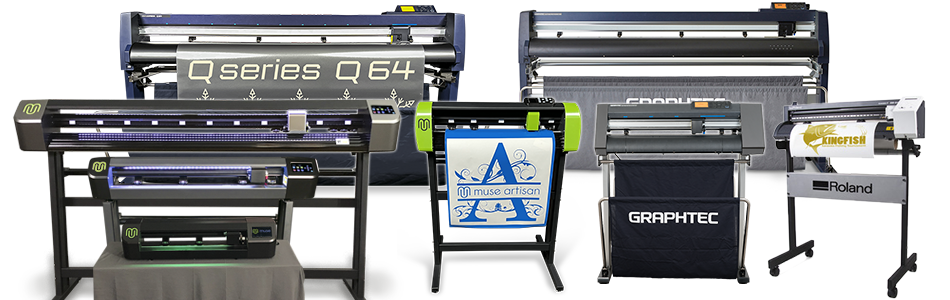
- Sign shops and pros: Banners, vehicle wraps, and PPF film using industrial servo plotters like Graphtec or Roland
Pick the wrong category and you will either overspend or hit performance limits fast.
Compare Top Consumer Ecosystems
The home vinyl cutting market is dominated by two ecosystems: Cricut and Silhouette. Each offers a different philosophy, balancing ease-of-use against flexibility.
Cricut: Best for Beginners and Crafters
Cricut prioritizes simplicity. Its cloud-based Design Space software guides users step-by-step, and the massive 8M+ community ensures help is always available.
Cricut Maker 4: Power for Mixed Media
The Maker 4 is the most versatile Cricut. Its Adaptive Tool System unlocks unmatched material range.
- Cutting force: 4,000 gf (handles leather, wood, fabric)
- Tools supported: 13+ including rotary blade, knife blade, and debossing tip
- Matless cutting: Yes, with Smart Materials only
- Price: $399
- Best for: Quilters, leather crafters, and makers using thick materials
Use the rotary blade for unbacked cotton or the knife blade for 2mm balsa wood. The Maker 4 cuts 2× faster than the Maker 3 and includes USB-C connectivity.
Pro tip: Pair with Cricut Access if you want premium designs, but basic cutting is free.
Cricut Explore 5: Best Value Entry
The Explore 5 is 30% more compact than its predecessor but delivers full 12-inch performance.
- Cutting force: 400 gf (vinyl, HTV, cardstock)
- Speed: Fast, matching the Explore 4
- Matless cutting: Smart Materials only
- Price: $199 standalone
- Best for: Stickers, home decor, and everyday crafting
New features include AI-powered “Create AI” (paid) and an integrated blade system. This is the smartest entry point for new crafters.
Warning: Older accessories may need adapters to work with the Explore 5.
Cricut Joy 2: Most Portable Option
The Joy 2 is ultra-portable and now supports Print Then Cut and scoring.
- Size: 9.1 inches wide, weighing 2 lbs
- Cutting width: 4.5 inches using Joy-specific mats
- Matless cutting: Smart Materials up to 4 feet
- Connectivity: Bluetooth only
- Best for: Labels, small stickers, and on-the-go projects
No USB data connection exists on this model. Everything runs via Bluetooth.
Cricut Joy Xtra: Compact but Full-Size Ready
Bridges the gap between Joy and Explore.
- Width: 12.5 inches
- Weight: 6 lbs
- Feature: Built-in sensor for Print Then Cut
- Connectivity: Bluetooth only
- Best for: Sticker sellers with limited space
Great for small businesses needing professional sticker output without a large footprint.
Silhouette: Power and Open Flexibility
Silhouette offers more power and freedom at the cost of a steeper learning curve.
Silhouette Cameo 5: Top Choice for HTV Businesses
The Cameo 5 delivers 133% faster cuts than the Cameo 4 and includes a One-Touch Repeat button.
- Cutting force: Up to 5,000 gf, the highest in the home category
- Speed: 400 mm/s (15.7 in/s)
- Matless cutting: Works with any lined vinyl (no brand lock-in)
- Dual carriage: Run two tools at once
- Price: $399
- Best for: High-volume HTV and batch production
Unlike Cricut, this machine does not require proprietary Smart Materials. Save money by buying bulk vinyl.
Key advantage: No subscription needed. Upgrade to Designer Edition ($49.99 one-time) for SVG import.
Silhouette Cameo 4: Still a Strong Contender
Nearly identical to the Cameo 5 but slower and lacking some refinements.
- Cutting force: 5,000 gf (Carriage 2)
- Features: Built-in roll feeder with cross-cutter
- Connectivity: USB and Bluetooth
- Best for: Users who want Cameo power at a slight discount
Still a powerhouse for serious crafters.
Silhouette Portrait 4: Best Budget Pick
Packs Cameo 5-level tech into a compact body.
- Width: 8 inches
- Cutting force: 210 gf
- Matless cutting: Up to 16 feet with any lined material
- Weight: 4 lbs
- Price: $199
- Best for: Stickers, labels, and small decals
Ideal for beginners on a budget who plan to grow into larger machines.
Specialized Machines for Unique Needs

Not all cutters fit the Cricut or Silhouette mold. These models solve specific problems.
Brother ScanNCut SDX125 and SDX2250D: Best for Artists
No other home cutter has a scanner. Draw a sketch, scan it, and cut it without a computer.
- Built-in scanner: 600 DPI for scanning drawings and photos directly
- Cutting area: 12×12 inches
- Software: Brother CanvasWorkspace (free, supports AI and PS files)
- Best for: Digitizing hand-drawn art, educators, and illustrators
This model has a steeper learning curve but offers unmatched creative workflows.
Siser Juliet: HTV Speed Demon
Built by a leading HTV brand, the Juliet includes pre-loaded settings for Siser materials.
- Cutting force: 800 gf
- Speed: 600 mm/s, the fastest for thin materials
- Matless cutting: Up to 15 feet
- Software: Leonardo Design Studio (free)
- Best for: T-shirt businesses using Siser HTV
The fastest cutter in its class, ideal for high-volume production.
xTool M1 Ultra: 4-in-1 Hybrid Powerhouse
Cut vinyl, engrave wood, and print full-color designs, all in one machine.
- Functions: Laser, blade, inkjet, and pen
- Swap time: 3 seconds with tool-less changes
- Cutting area: 11.8″ x 11.8″
- Price: Starts at £1,259
- Best for: Tech-savvy makers creating multi-material products
No subscription required. Limited to a fixed bed with no long banners, but perfect for complex layered projects.
Professional and Industrial Cutters: Beyond the Hobby
For sign shops, vehicle wraps, or 24/7 production, consumer machines will not cut it. You need servo motors, wide formats, and industrial durability.
Stepper vs. Servo: Know the Difference
| Feature | Stepper Motor | Servo Motor |
|---|---|---|
| Accuracy | Good | Excellent with feedback loop |
| Speed | Up to 39 in/s | Up to 60 in/s |
| Durability | Moderate | High, built for 8+ hour runs |
| Best For | Light commercial use | Industrial production |
Servo motors maintain precision under load, which is critical for expensive films like PPF or reflective vinyl.
Top Industrial Machines by Use Case
Graphtec FC9000: Best for Wide-Format Sign Shops
Graphtec is known for speed and precision. The FC9000 handles PPF film, window tint, and reflective vinyl with ease.
- Width options: 30″ to 64″
- Speed: 58.49 in/s
- Motor: Servo
- Max cut length: 1968″
- Warranty: 3 years
- Best for: Banners, vehicle wraps, and long runs
Auto contour cutting ensures perfect registration on every job.
Roland GR2: Reliable High-Volume Workhorse
Roland’s reputation for reliability shines here. This model integrates smoothly with Roland printers.
- Width: 54″ or 64″
- Speed: 60 in/s
- Motor: Servo
- Warranty: 3 years
- Best for: Print-and-cut workflows and large signage
Built for non-stop operation in demanding environments.
VS Evo: High Pressure for Tough Materials
Delivers the highest cutting pressure in its class.
- Max pressure: 1000g
- Motor: DC Servo
- Contour cut: Yes
- Best for: Thick HTV, rhinestones, and textured films
Ideal for materials that resist standard blades.
Key Buying Factors Explained
Cutting Force: Match to Your Materials
- 210 to 400 gf: Vinyl, HTV, and paper
- 800 to 1000 gf: Thick HTV, stencils, and chipboard
- 4,000 to 5,000 gf: Leather, wood, and metal foil
- Industrial (600g+ with servo): PPF, sandblast masks, and reflective films
Note: A 5,000 gf servo motor cuts tougher materials than a 5,000 gf stepper due to consistent force delivery.
Matless Cutting: Save Time and Money
- Cricut: Requires Smart Materials, which are proprietary and cost more
- Silhouette: Works with any lined vinyl for huge savings on bulk orders
- Industrial: Roll-to-roll with pinch rollers, no special backing needed
For small businesses, Silhouette’s open matless system can save hundreds per year.
Software: Free vs. Subscription vs. One-Time Fee
| Brand | Software | Cost Model | SVG Import? |
|---|---|---|---|
| Cricut | Design Space | Free base; Access subscription ($120/yr) | Free |
| Silhouette | Studio | Free; upgrades ($50 to $100 one-time) | Paid upgrade |
| Brother | CanvasWorkspace | Free on web, PC, and mobile | Yes |
| Siser | Leonardo | Free; PRO optional | Yes |
| Industrial | SignMaster, GreatCut | Bundled | Yes |
Cricut pushes subscriptions. Silhouette offers offline power with one-time fees. Choose based on your budget and workflow.
Connectivity: What You Need
- Bluetooth: Standard on consumer models for mobile and tablet control
- USB-C: Newer Cricut models offer faster data transfer
- WiFi or Ethernet: Essential for shop environments with network sharing
- U-Disk or SD: Found on industrial models for PC-free operation
For collaborative shops, WiFi or Ethernet is non-negotiable.
Who Should Buy What?
The Complete Beginner
- Pick: Cricut Explore 5
- Why: Affordable, compact, guided workflows, and massive support community
- Skip if: You plan to scale into high-volume production
Small Business (Stickers and HTV)
- Pick: Silhouette Cameo 5
- Why: No subscription, fast batch cutting, and matless with any vinyl
- Alternative: Siser Juliet if using Siser HTV exclusively
Mixed Media Artist
- Pick: Cricut Maker 4
- Why: Rotary blade for fabric, knife blade for wood, and 13+ tools
- Skip if: You only cut vinyl, as this is overkill
Sign Shop or Pro Shop
- Pick: Graphtec FC9000 or Roland GR2
- Why: Servo motors, wide format, 3-year warranty, and industrial reliability
- Must-have: Auto contour cut, roll feed, and network connectivity
Tech Innovator
- Pick: xTool M1 Ultra
- Why: Laser, blade, and inkjet in one, perfect for prototyping and complex products
- Consider: Fixed bed limits long formats
Maintenance Tips for Longevity
Even the best vinyl cutter needs care to perform well over time.
- Blade life: Replace every 3 to 6 months. Ragged cuts signal a worn blade.
- Clean rollers: Wipe monthly to prevent media slippage during cuts.
- Calibrate after blade changes: Always run a test cut to verify accuracy.
- Store properly: Cover when not in use to avoid dust buildup inside.
- Warranty: Consumer models offer 1 year; industrial models offer 1 to 3 years.
Roland and Graphtec offer 3-year warranties, a sign of superior build quality.
Frequently Asked Questions About Vinyl Cutters
Do I need a subscription to use a vinyl cutter?
No. Cricut Design Space and Silhouette Studio both work without a subscription. Subscriptions unlock premium designs or SVG import (Silhouette), but basic cutting of uploaded or drawn designs is free on both platforms.
Can I cut fabric without backing or stabilizer?
Only specific machines handle unbacked fabric effectively. The Cricut Maker series and Silhouette Cameo 4 or 5 (with Rotary Blade) can cut unbacked cotton, felt, and leather. Explore-class machines and the Portrait require fabric to be bonded or stabilized with iron-on backing.
What is contour cutting or Print Then Cut?
Contour cutting, also called Print Then Cut, involves printing a design with registration marks and having the cutter scan those marks to cut precisely around the printed image. Most modern consumer machines and all professional plotters support this feature.
Is a more expensive vinyl cutter always better?
Not always. A $200 Cricut Explore 5 cuts vinyl as cleanly as a $400 Maker 4. Pay more only if you need higher force, faster speed, or wider format. In the industrial sector, higher cost buys speed, width, and servo-motor durability for continuous production.
What is the difference between stepper and servo motors?
Stepper motors move in discrete steps and work well for general crafting. Servo motors use feedback loops to ensure precise positioning regardless of load or speed. Servo motors offer smoother acceleration, higher top speeds (40 to 60 in/s), and longer lifespans under continuous operation.
How long do vinyl cutter blades last?
A typical fine-point blade lasts 3 to 6 months with regular use. Signs of wear include ragged cuts, dragging, or incomplete weeding. Replacement blades are inexpensive for consumer machines and widely available online.
Key Takeaways for Choosing Your Vinyl Cutter

The best vinyl cutter is not the most expensive. It is the one that fits your use case, budget, and growth plans. Start with your primary projects, then match the machine to the mission.
For beginners, the Cricut Explore 5 offers unbeatable value and community support. For small businesses running high-volume HTV production, the Silhouette Cameo 5 saves money with open matless cutting and no subscriptions. Mixed media artists should invest in the Cricut Maker 4 for its unmatched tool ecosystem. Sign shops and pro studios need the reliability of servo-driven machines like the Graphtec FC9000 or Roland GR2.
Your next step is simple: identify your top three projects, set a realistic budget, and choose the machine that handles those tasks with room to grow. Whether you are making your first sticker or your 10,000th T-shirt, there is a perfect cutter waiting for you.