How to Remove Laser Ink from Paper
Laser printer toner is notoriously difficult to remove. Unlike inkjet ink that soaks into paper fibers, laser toner is a plastic powder fused to the surface using heat and pressure. This creates a strong bond that resists water, solvents, and even vigorous wiping. If you’ve printed the wrong name, made a typo, or need to reuse paper, you might wonder if laser ink can actually be removed. The short answer is yes, but with caveats. No home method completely erases toner without some risk to the paper. This guide breaks down every practical method, from DIY fixes to experimental technology, so you can choose the safest and most effective approach for your needs.
Understand Laser Toner vs. Inkjet Ink
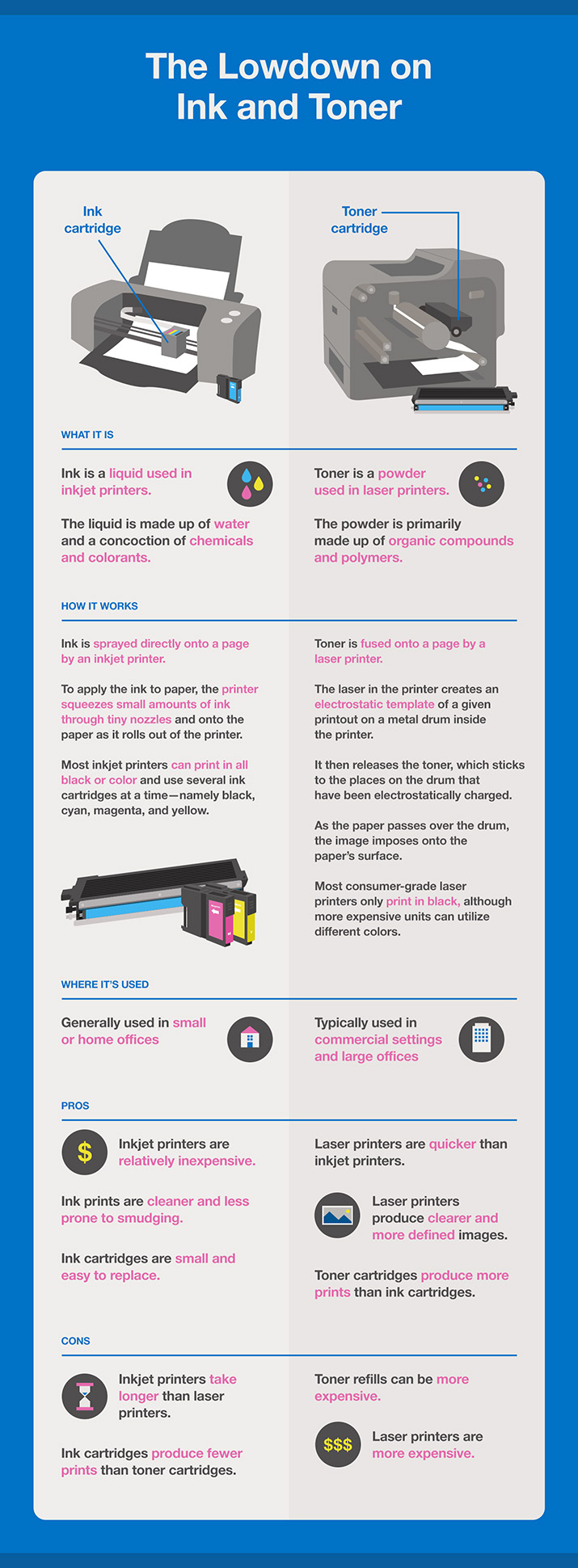
Laser toner sits on top of paper, bonded by heat. Unlike inkjet ink that soaks into fibers, toner melts and adheres like plastic. This makes it durable but hard to remove without damaging the paper surface.
Why Solvents Fail on Laser Ink
Common liquids like isopropyl alcohol, acetone, and bleach do not dissolve toner. They may discolor paper or remove marker ink, but fused toner remains intact. Attempting solvent based removal often weakens paper fibers without achieving results.
Identify Your Printer Type First
Check your cartridge label to confirm you’re dealing with laser toner. Inkjet cartridges include HP 61, Canon PG-245, and Epson T04T. Laser cartridges include Brother TN660, HP CF280X, and Samsung MLT-D101. Only proceed with removal methods if you’re certain you’re dealing with laser toner.
Physical Removal Methods That Work
Physical techniques offer the most realistic results for removing laser ink from paper at home. These methods work by lifting the fused toner layer rather than dissolving it.
Use a Razor Blade to Scrape Toner
Hold a sharp razor blade at 90 degrees to the paper. Use light, one-directional strokes and focus on the corner of the blade to minimize contact area. This method removes most visible toner but risks tearing thin paper.
Pro Tip: Always practice on scrap paper first. Use 5 to 10 test runs to refine pressure and angle before attempting on important documents.
Clean Residue with a Pencil Eraser
After scraping, gently rub a soft pencil eraser over the area. It lifts leftover toner dust and smooths the surface. Avoid excessive pressure to prevent paper thinning.
Try Fine Sandpaper for Stubborn Areas
Use 400 or higher grit sandpaper to lightly abrade the printed area. This removes toner along with a thin layer of paper. While effective, it alters texture and reduces paper strength. This method works best for non-critical documents.
Warning: Sanding makes paper translucent in spots and limits reuse potential.
Tape Lift Technique for Low Risk Removal
Press 2-inch transparent medical tape over the toner and peel slowly. Repeat with fresh tape sections. This works best on poorly fused or fresh prints.
Limitation: Rarely removes all toner. It may pull paper fibers. Use only as a preliminary step before attempting more aggressive methods.
Why Chemicals Do Not Work
Chemical solvents are largely ineffective against fused laser toner. Understanding why helps you avoid wasting time and damaging your documents.
Bleach Fails on Fused Toner
Household bleach does not dissolve toner. It yellows paper and weakens fibers but leaves plastic based toner intact. Success stories usually involve marker ink, not laser printing.
Acetone Leaves Residue
Fingernail polish remover may soften some inks but leaves an oily film in paper. It does not lift toner and is ineffective and potentially damaging.
Isopropyl Alcohol Has No Effect
Even high concentration IPA used in printer cleaners does not affect laser toner. It evaporates quickly without interacting with the plastic polymer.
Advanced Laser Unprinting Technology

Researchers have developed promising technologies for removing laser ink, though these remain inaccessible for home use.
Green Pulse Ablation Method
Researchers at the University of Cambridge developed a method using nanosecond pulses of green laser light. The toner absorbs the energy and vaporizes, while paper remains unharmed due to its transparency at that wavelength.
Effectiveness: Removes 95 to 100 percent of toner.
Paper Reuse: Up to 5 times.
Eco Impact: 95 percent less carbon dioxide than recycling.
Reality Check: The prototype costs $24,000, making it not feasible for home use.
Toshiba e-Blue Reversible Toner System
Toshiba’s e-Blue printer uses special toner that can be erased with heat or light. However, it only works with proprietary cartridges, not standard laser printers. This system is ideal for internal drafts but not general document correction.
Hybrid Fix: Correct Without Full Removal
When full removal is not possible, consider cosmetic correction techniques that make errors invisible.
Create a Digital Text Replacement
Open Photoshop or similar software. Type the correct word in Times New Roman. Adjust font size in 0.5 point increments to match the original variation. Print this replacement text for use in the transfer method below.
Print and Transfer with Heat
Flip the image horizontally and print on a blank sheet. Cut out the text and place it upside down on the correction spot. Tape it in place and cover with a blank sheet. Iron on low heat for 20 to 25 seconds. Peel off the slip and the text transfers seamlessly.
Success Tip: Match your printer’s output exactly. Test font size and pressure on scrap paper first.
Tools and Risks Comparison
| Tool | Removes Toner | Risk Level | Paper Reusable |
|---|---|---|---|
| Razor blade | Yes (partial) | High | Reduced |
| Sandpaper | Yes | High | Limited |
| Clear tape | Slight | Low | Yes |
| Bleach | No | High | Damaged |
| Acetone | No | Medium | Damaged |
| Green laser | Yes (full) | None (industrial) | Yes |
| Heat transfer | Cosmetic fix | Medium | Yes |
Best Practices for Safe Removal
Always test your method on the same paper type first. Evaluate results under bright light. Look for thinning, ghosting, or fiber lifting before proceeding.
Prioritize Document Value
For legal, official, or archival documents, do not attempt physical removal. Instead, scan the page, edit digitally, and reprint on fresh paper. This preserves document integrity.
Act Quickly on Fresh Prints
Toner bonds more firmly over time. New prints may be slightly easier to modify, though still resistant. Speed matters, but do not rush at the expense of testing first.
Accept Imperfect Results
Perfect restoration is nearly impossible at home. Expect faint shadows or texture changes even after successful removal. Plan for touch-up work or digital correction.
Frequently Asked Questions About Removing Laser Ink
Can you remove laser toner from paper without damaging it?
No method completely removes laser toner without some risk to paper. Razor scraping works but may thin or tear the paper. Chemical solvents fail entirely. The Cambridge laser method works perfectly but costs $24,000 and is not available for home use.
Does bleach remove laser printer ink?
No. Bleach does not dissolve toner. It may fade dye based inks but leaves plastic based toner intact. Bleach also yellows and weakens paper fibers, making it counterproductive for document correction.
What is the best tool for scraping laser toner?
A sharp razor blade held at 90 degrees provides the most control. Use light strokes and practice on scrap paper first. Follow with a soft pencil eraser to lift residual toner dust.
Can you reuse paper after removing toner?
Yes, but with limitations. Scraping and sanding reduce paper thickness and strength. The Cambridge laser method allows reuse up to 5 times, but this technology is not accessible for home users.
Is heat transfer an effective correction method?
Yes, for cosmetic fixes. The heat transfer technique works well when you need to replace specific text. It requires practice and precise font matching, but produces seamless results on corrected documents.
Are there commercial unprinting machines available?
Toshiba e-Blue offers reversible toner technology, but it requires proprietary cartridges. True laser unprinting machines cost thousands of dollars and are not practical for home or small office use.
Key Takeaways for Removing Laser Ink From Paper
Laser toner is plastic powder fused with heat, making it resistant to common solvents and liquids. Physical removal methods like razor scraping and sanding offer the most realistic results, though they carry risks of paper damage. Chemical approaches using bleach, acetone, or alcohol are completely ineffective and may harm your documents. Advanced technologies like Cambridge’s green laser ablation work perfectly but remain inaccessible due to cost. For practical correction, combine physical removal with digital text replacement and heat transfer. Always test on scrap paper first, prioritize document value, and accept that imperfect results are the reality of home laser ink removal.